

Sand Calculator
Estimate area, volume, weight, and optional total cost for sand.
Inputs
Results
Step-by-step derivation
Enter values and click Calculate.
References
- Rectangle area:
A = L × W - Volume:
V = A × d - Weight:
W = ρ × V - Typical dry sand bulk density is often around
1600 kg/m³, but real values vary by moisture and compaction.
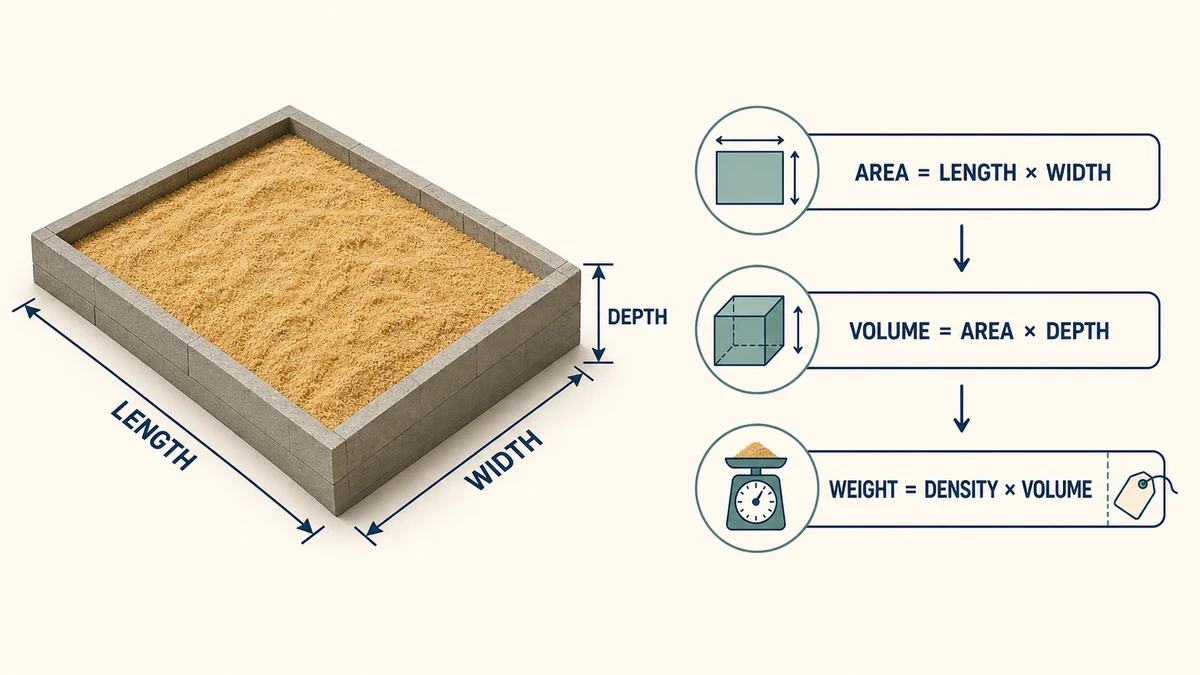
A shallow change in sand depth can turn into a large change in the amount you need across a patio, trench, playground, or landscape bed. This Sand Calculator converts your measured length and width—or a known area—plus the intended depth into area, volume, estimated weight, and optional material cost. It supports metric and imperial units, so you can measure in the units available on site and read the result in the units used by your supplier.
What the Sand Calculator Estimates
The calculator has two measurement modes. Choose Rectangle area when you can enter length and width, or choose Known area when the surface area has already been measured. Add the sand depth and density, then select no pricing, price per volume, or price per weight.
The results show area in square meters, square feet, or square yards; volume in cubic meters, cubic yards, or cubic feet; and weight in tonnes, kilograms, or pounds. When pricing is enabled, the calculator also estimates total material cost in the selected currency and displays a step-by-step derivation.
How to Use the Sand Calculator
- Select Rectangle area or Known area.
- Enter length and width, or enter the known area directly.
- Enter the planned sand depth and select cm, m, in, or ft.
- Enter the appropriate bulk density and choose kg/m³, t/m³, or lb/ft³.
- If needed, select pricing by volume or weight, choose the currency, and enter the supplier’s unit price.
- Click Calculate, then review the area, volume, weight, cost, and derivation.
Measure several points when the ground is uneven and use a realistic average depth. If the project has an irregular outline, divide it into smaller rectangles, calculate each section, and add the quantities. You can also find the surface first with the Square Footage Calculator and then use the known-area mode here.
Sand Calculation Formulas
For a rectangular project, the surface area is:
Area = Length × Width
Once area and depth are expressed in compatible units, sand volume is:
Volume = Area × Depth
Bulk density converts that volume into an estimated mass:
Weight = Density × Volume
If the supplier quotes per unit of volume or weight, estimated material cost is:
Total cost = Calculated quantity × Unit price
These relationships follow ordinary rectangular-volume measurement. An OpenLearn measurement example demonstrates volume from length, width, and height. For checking cubic-meter, cubic-foot, and cubic-yard conversions, use the NIST conversion guidance.
Worked Sand Quantity Example
Suppose a rectangular bed is 5 m long and 3 m wide, with sand placed 10 cm deep. The area is 5 × 3 = 15 m². Convert 10 cm to 0.10 m, then calculate volume: 15 × 0.10 = 1.5 m³.
Using a planning density of 1,600 kg/m³, the estimated weight is 1.5 × 1,600 = 2,400 kg, or 2.4 tonnes. If a supplier charges by the tonne, multiply 2.4 by the price per tonne. If the quote is per cubic meter, multiply 1.5 by the price per cubic meter. Do not compare those two prices directly without accounting for density.
Why Sand Density Changes the Weight
Volume describes the space occupied by the sand; weight describes its mass. Bulk density connects them, but it is not identical for every load. Grain size distribution, void space, moisture, handling, and compaction can all affect how much a cubic meter or cubic yard weighs. The USGS discussion of bulk density and moisture explains why density measurements depend on the material’s condition.
Use the density listed by your supplier whenever possible. A general default is useful for early planning, but a supplier value is better for ordering, hauling, or cost comparison. Wet sand may be heavier than dry sand, while loose delivered material may occupy more space before it settles or is compacted.
Compaction, Settlement, and Extra Sand
The calculator assumes a uniform finished layer. Real sites often contain low spots, sloped edges, spillage, and material that settles during spreading. Compaction requirements also depend on the application. The Federal Highway Administration guidance shows that moisture and density control matter when fill is placed and compacted.
For informal landscape work, a modest allowance may cover normal measurement error and loss. Do not automatically apply a generic percentage to specification-controlled work; use the drawing, supplier recommendation, or engineer’s required compacted quantity. Confirm whether the seller’s quote describes loose, delivered, or compacted volume before placing an order.
Estimating Sand Cost Accurately
Choose the pricing mode that matches the quote exactly. Price per volume is appropriate for rates per m³, yd³, or ft³. Price per weight is appropriate for rates per tonne, kilogram, or pound. The calculated total is a material estimate only unless the unit price already includes other charges.
Ask about delivery, loading, taxes, bag premiums, minimum order quantities, pallet deposits, waiting time, and restricted-access fees. A lower unit rate can produce a higher delivered total. When comparing packaged products or quotes expressed in different weight units, the Weight Price Comparison Calculator can help standardize the comparison.
Common Projects and Related Calculators
This method works well for paver bedding, play areas, landscape leveling, garden features, trench bedding, and other projects where sand covers a measured area at an approximately uniform depth. Check the specified material and installed depth for pavers, utilities, drainage systems, structural bases, or playground safety surfaces.
For crushed stone or mixed aggregate, use the Gravel Calculator. For slabs, pads, footings, or columns, use the Concrete Calculator. If your supplier sells bulk material by cubic yard, the Cubic Yard Calculator provides a focused volume conversion.
Frequently Asked Questions
How do I calculate how much sand I need?
Multiply the surface area by the required sand depth. For a rectangle, first multiply length by width. Keep all dimensions in compatible units, then convert the resulting volume into cubic meters, cubic yards, or cubic feet as needed.
How does the calculator convert sand volume to weight?
It multiplies volume by the bulk density you enter. Because moisture, grading, void space, and compaction affect bulk density, the displayed weight is an estimate. Use your supplier’s current density when available.
Should I enter loose depth or compacted depth?
Enter the depth that represents your project requirement, then confirm whether the supplier quantity is based on loose or compacted material. For engineered or specification-controlled work, follow the required installed depth and compaction procedure.
Can I calculate sand in cubic yards?
Yes. Enter the project dimensions and depth in any supported units, calculate the result, and view volume in cubic yards. One cubic yard equals 27 cubic feet; NIST conversion references can be used for metric comparisons.
Can the result tell me how many bags to buy?
The calculator gives volume and weight rather than a direct bag count. Divide the estimated total weight by the net weight printed on one bag, then round up to a whole bag and account for any appropriate project allowance.
Does the estimated cost include delivery and labor?
Not automatically. It multiplies the calculated sand quantity by the unit price entered. Add delivery, taxes, loading, labor, minimum-order charges, and other supplier fees separately unless they are already included in that rate.
Planning note: Results depend on measurements, depth, density, moisture, compaction, settlement, waste, and the supplier’s selling method. Confirm material type, installed depth, quantity, and delivery terms before ordering. For structural, drainage, utility, or safety-critical work, follow the project specification and qualified professional guidance.
Order Sand by Compacted or Loose Volume as Appropriate
The geometric volume of a bed or excavation is only the starting point. Sand density, moisture, compaction, uneven subgrade, waste, and supplier units affect the delivered quantity. Convert all dimensions consistently, subtract large excluded areas, and ask the supplier whether material is sold by loose volume, weight, or compacted coverage before placing an order.