Framing Calculator

Estimate base studs, studs to buy, and total stud cost for a wall.

Wall Inputs

Common OC spacings: 400 mm, 406.4 mm (16″), 487.68 mm (19.2″), 609.6 mm (24″).

Pricing
%

Waste helps cover offcuts, defects, and mistakes. Many builds use around 10% to 15%.

Results
Base studs needed
Includes both end studs. No waste added.
Studs to buy
Waste applied, then rounded up to whole studs.
Total cost
Based on studs to buy × price per stud.
Step-by-step
  1. Convert wall length and spacing to meters.
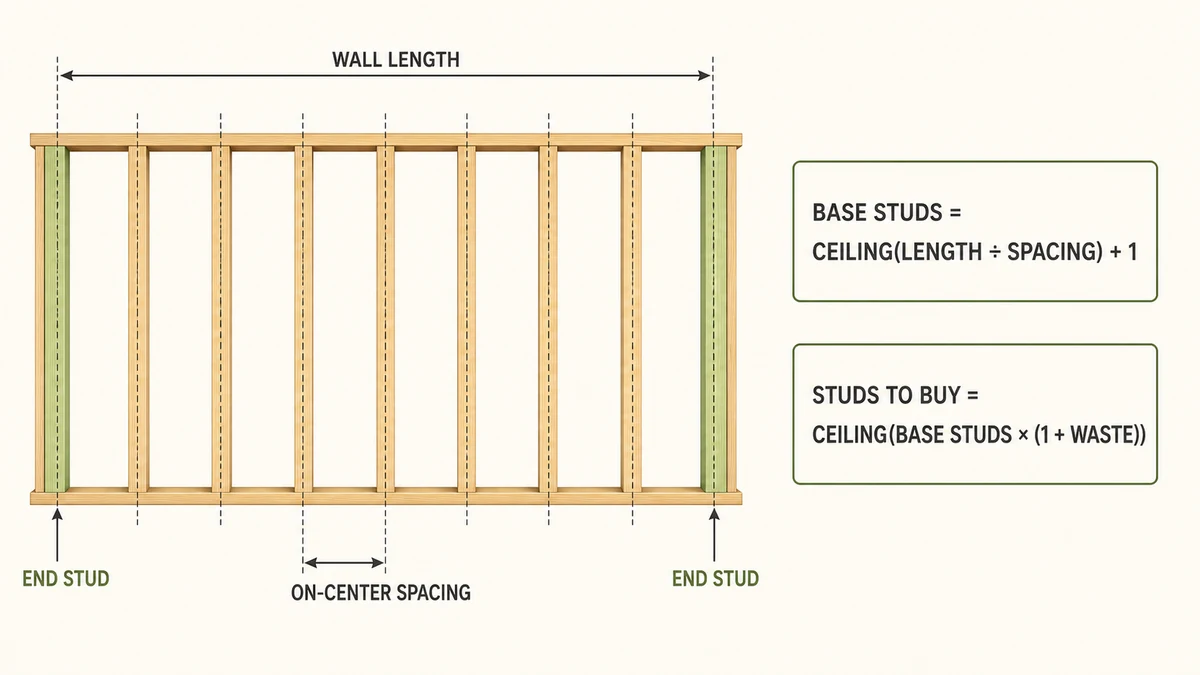
  2. Base studs = ceil(L / s) + 1 so both ends are studded even when the length is not an exact spacing multiple.
  3. Studs to buy = ceil(base studs × (1 + waste)).
  4. Total cost = studs to buy × price per stud.
Assumptions
  • This estimates studs along one straight wall run only.
  • Door openings, corners, extra kings/jacks, plates, and blocking are not included.
  • Waste is applied to the stud quantity you buy, then rounded up to whole studs.

Use this Framing Calculator to estimate how many wall studs you need for a straight wall run. Enter the wall length, on-center stud spacing, price per stud, and estimated waste percentage to calculate base studs needed, studs to buy, and total stud cost.

Important Note: This Framing Calculator provides a simple straight-wall stud estimate only. It estimates regular vertical studs from wall length and on-center spacing, then applies waste and optional price per stud. It does not calculate a complete framing takeoff or verify whether a wall design is structurally acceptable.

Stud spacing depends on wall type, stud size, lumber grade, wall height, bearing load, sheathing, bracing, wind/seismic requirements, local building code, and project drawings. Use this calculator for planning estimates only, and confirm real construction requirements with your approved plan, inspector, local code, contractor, or qualified building professional.

Reviewed by: AjaxCalculators Editorial Team
Last updated: April 29, 2026
Method source: Standard straight-wall stud count estimate using base studs = ceil(wall length ÷ on-center spacing) + 1, then applying waste and rounding up to whole studs
Editorial standards: AjaxCalculators Editorial Policy

What This Framing Calculator Estimates

This calculator estimates the number of vertical studs needed along one straight wall run. It also estimates how many studs to buy after adding waste and calculates the total material cost from the entered price per stud.

The calculator can estimate:

  • Base studs needed
  • Studs to buy after waste
  • Total stud cost
  • Stud count from wall length and OC spacing
  • Cost estimate from price per stud
  • Step-by-step stud count derivation

The live tool supports wall length and OC spacing in units such as millimeters, centimeters, meters, kilometers, inches, and feet. It also supports currency labels for the price-per-stud and total-cost result.

What “On-Center” Stud Spacing Means

On-center spacing, often written as OC or o.c., means the distance from the center of one stud to the center of the next stud.

For example:

  • 16 inches on-center means each stud center is 16 inches from the next stud center.
  • 24 inches on-center means each stud center is 24 inches from the next stud center.
  • 400 mm on-center means each stud center is 400 mm from the next stud center.

The calculator uses OC spacing to estimate how many stud positions fit along the wall length, then adds an end stud so both ends of the wall are counted.

Common Stud Spacing Values

The live calculator lists common on-center spacing values used in metric and imperial framing layouts. Always use the spacing required by your plan, code, wall type, and inspection authority.

Spacing Imperial Equivalent Common Use Note
400 mm About 15.75 inches Common metric layout spacing
406.4 mm 16 inches Very common wall stud spacing
487.68 mm 19.2 inches Used in some framing grid layouts
609.6 mm 24 inches Often used in advanced framing where permitted by design and code

Do not select wider spacing only to reduce material cost. Wider spacing must still meet wall design, sheathing, drywall, load, bracing, wind, seismic, and local code requirements.

How the Framing Calculator Works

1) Convert Wall Length and Spacing to the Same Unit

The calculator first converts the wall length and stud spacing into a consistent internal unit. This is necessary because users may enter wall length in feet and spacing in inches, or wall length in meters and spacing in millimeters.

For example:

  • 4800 mm = 4.8 m
  • 400 mm = 0.4 m
  • 16 inches = 406.4 mm
  • 24 inches = 609.6 mm

2) Calculate Base Studs

The calculator divides wall length by on-center spacing to estimate the number of spacing intervals. It then rounds up and adds one end stud.

Base studs = ceil(wall length ÷ OC spacing) + 1

Using symbols:

B = ceil(L / s) + 1

In this formula:

  • B is base studs needed
  • L is wall length
  • s is on-center stud spacing
  • ceil means round up to the next whole number

The added +1 accounts for the end stud. This makes sure both ends of the wall are studded, even when the wall length is not an exact multiple of the stud spacing.

3) Apply Waste

After the base stud count is known, the calculator applies the waste percentage.

Studs before rounding = base studs × (1 + waste percentage ÷ 100)

Waste helps cover offcuts, damaged lumber, mistakes, rejected pieces, and small layout adjustments.

4) Round Up to Whole Studs

You cannot buy a fraction of a stud in normal framing material estimates, so the calculator rounds the waste-adjusted quantity up to a whole number.

Studs to buy = ceil(base studs × (1 + waste percentage ÷ 100))

5) Calculate Total Cost

The calculator multiplies the number of studs to buy by the price per stud.

Total cost = studs to buy × price per stud

Framing Formula Summary

What You Want to Find Formula Meaning
Base studs needed B = ceil(L / s) + 1 Wall length divided by spacing, rounded up, plus one end stud
Waste multiplier 1 + waste% / 100 Converts the entered waste percentage into a multiplier
Studs to buy ceil(B × (1 + waste% / 100)) Base studs with waste added, rounded up to a whole stud
Total cost Studs to buy × price per stud Estimated cost for vertical studs only

Worked Example: Stud Count for a 4800 mm Wall

Suppose you have:

  • Wall length: 4800 mm
  • Stud spacing: 400 mm OC
  • Price per stud: $3.25
  • Waste: 10%

Step 1: Divide wall length by spacing
4800 ÷ 400 = 12

Step 2: Add one end stud
Base studs = 12 + 1
Base studs = 13

Step 3: Apply 10% waste
Studs before rounding = 13 × 1.10
Studs before rounding = 14.3

Step 4: Round up to whole studs
Studs to buy = ceil(14.3)
Studs to buy = 15

Step 5: Calculate total cost
Total cost = 15 × 3.25
Total cost = $48.75

So, for a 4800 mm wall with 400 mm OC spacing and 10% waste, the calculator estimates 13 base studs, 15 studs to buy, and $48.75 total stud cost.

Worked Example: 12 ft Wall with 16 in OC Spacing

Suppose you are framing a straight wall with:

  • Wall length: 12 ft
  • Stud spacing: 16 in OC
  • Waste: 10%

Step 1: Convert wall length to inches
12 ft × 12 = 144 in

Step 2: Divide by OC spacing
144 ÷ 16 = 9

Step 3: Add the end stud
Base studs = 9 + 1
Base studs = 10

Step 4: Apply waste
10 × 1.10 = 11

Step 5: Round up
Studs to buy = 11

So, a 12 ft straight wall at 16 inches on-center needs 10 base studs, and with 10% waste, you should buy about 11 studs.

Worked Example: 20 ft Wall with 24 in OC Spacing

Suppose you are estimating a wall with:

  • Wall length: 20 ft
  • Stud spacing: 24 in OC
  • Price per stud: $4.50
  • Waste: 15%

Step 1: Convert wall length to inches
20 ft × 12 = 240 in

Step 2: Divide by spacing
240 ÷ 24 = 10

Step 3: Add one end stud
Base studs = 10 + 1
Base studs = 11

Step 4: Apply 15% waste
11 × 1.15 = 12.65

Step 5: Round up to whole studs
Studs to buy = 13

Step 6: Calculate cost
13 × 4.50 = $58.50

So, the wall needs 11 base studs, and the purchase estimate is 13 studs with a total cost of $58.50.

Worked Example: Wall Length Not Exactly Divisible by Spacing

Suppose a wall is 3700 mm long and studs are spaced at 400 mm OC.

Step 1: Divide length by spacing
3700 ÷ 400 = 9.25

Step 2: Round up the spacing count
ceil(9.25) = 10

Step 3: Add one end stud
Base studs = 10 + 1
Base studs = 11

The round-up step matters because the final partial spacing still needs a stud at the end of the wall.

How to Use This Framing Calculator

  1. Enter the wall length.
  2. Select the wall length unit, such as mm, cm, m, inches, or feet.
  3. Enter the OC spacing, also called on-center spacing.
  4. Select the spacing unit.
  5. Enter the price per stud if you want a cost estimate.
  6. Select the currency label for the cost result.
  7. Enter an estimated waste percentage.
  8. Click Calculate.
  9. Review the base studs, studs to buy, total cost, and step-by-step derivation.
  10. Click Reset to clear the calculator and start again.

How to Interpret the Results

Result What It Means Important Caution
Base studs needed The estimated number of regular vertical studs along the straight wall before waste. Includes both end studs, but does not include openings, corners, plates, headers, or blocking.
Studs to buy The base stud count after adding the selected waste percentage and rounding up. Real projects may still require extra pieces for defects, cuts, layout changes, and framing details.
Total cost Estimated stud cost from studs to buy multiplied by price per stud. This is stud cost only; it does not include plates, headers, sheathing, fasteners, labor, delivery, or tax.
Step-by-step derivation The calculation path used to estimate the result. Check that wall length and OC spacing match the actual framing plan.

What Is Included in the Stud Count?

This calculator estimates regular vertical studs along one straight wall run. The formula includes a stud at the beginning and a stud at the end of the wall.

Item Included? Note
Regular vertical studs along one straight wall run Yes Estimated from wall length and OC spacing
End studs Yes The +1 in the formula accounts for the final end stud
Waste allowance Yes Applied to studs to buy, then rounded up
Price per stud Yes Used for the total cost estimate

What Is Not Included?

This calculator is intentionally simple. It does not include all framing members required for a real wall assembly.

Item Not Included Why It Matters
Top plates and bottom plates These are horizontal framing members, not regular vertical studs.
Double top plates Many framed walls require multiple top plates depending on design and code.
Corners Corners often require extra studs or special framing details.
Door and window openings Openings may need king studs, jack studs, cripple studs, sills, and headers.
Headers Headers support loads above openings and require separate sizing.
Blocking and fire blocking May be required by design, code, wall height, or fire-safety requirements.
Sheathing, drywall, fasteners, anchors, straps, and connectors These are separate material takeoff items.
Structural load checks Stud size and spacing depend on load, height, grade, species, and code.

Why the Calculator Adds One Stud

If a wall length is divided into equal stud spaces, the number of studs is usually one more than the number of spaces. This is because a row of studs has a stud at the beginning and a stud at the end.

For example, a 1600 mm wall with 400 mm spacing has these positions:

  • 0 mm
  • 400 mm
  • 800 mm
  • 1200 mm
  • 1600 mm

That is 4 spaces but 5 stud positions. This is why the calculator uses:

ceil(L / s) + 1

Common Stud Count Examples

The examples below estimate regular vertical studs for one straight wall only. They do not include openings, corners, plates, blocking, or headers.

Wall Length OC Spacing Base Studs Studs to Buy with 10% Waste
8 ft 16 in 7 8
10 ft 16 in 9 10
12 ft 16 in 10 11
16 ft 16 in 13 15
20 ft 16 in 16 18
20 ft 24 in 11 13

Stud Waste Percentage

The waste percentage increases the number of studs to buy. Waste can help cover cutting errors, defects, damaged boards, layout changes, rejected pieces, and small measurement differences.

Common planning waste ranges include:

  • 0% for a pure theoretical count with no extra material
  • 5% for a very controlled project with minimal cutting
  • 10% for many typical small wall estimates
  • 15% when there may be more defects, offcuts, mistakes, or layout uncertainty

For a real project, it is often better to buy a few extra studs than to stop work because of one missing or defective piece.

16-Inch vs 24-Inch On-Center Spacing

Two common framing layouts are 16 inches on-center and 24 inches on-center. Wider spacing uses fewer studs, but it must be suitable for the wall assembly, load, sheathing, drywall, bracing, and local code.

Spacing Stud Count Impact Important Note
16 in OC More studs Very common for residential wall framing
24 in OC Fewer studs Often associated with advanced framing where permitted
400 mm OC Similar to 16 in OC Common metric layout spacing
600 mm OC Similar to 24 in OC Common metric wide-spacing layout

Do not choose 24-inch OC or wide metric spacing only to save money. Use the spacing required by your approved construction plan and local code.

Framing Cost Estimate

The total cost result is calculated from the number of studs to buy and the price per stud.

Total cost = studs to buy × price per stud

For example, if the calculator says to buy 18 studs and each stud costs $4.25:

Total cost = 18 × 4.25 = $76.50

This result estimates stud cost only. It does not include plates, headers, sheathing, fasteners, adhesive, tools, delivery, tax, labor, or waste beyond the entered stud waste percentage.

Currency Label Note

The currency selector is useful for labeling the price and total cost result. It does not convert exchange rates. For example, changing from USD to BDT changes the label, but it does not convert the entered price using a live exchange rate.

Enter the price per stud in the currency you selected, and the calculator will multiply that value by the estimated studs to buy.

When a Simple Stud Count Is Not Enough

A simple stud count is useful for quick estimates, but a real framing takeoff may need more detail. Extra material may be needed for:

  • inside corners
  • outside corners
  • intersecting walls
  • partition tees
  • door openings
  • window openings
  • king studs
  • jack studs
  • cripple studs
  • headers
  • sills
  • blocking
  • fire blocking
  • bracing
  • top plates and bottom plates

If your wall includes openings or structural loads, use the calculator as a starting estimate only and complete a detailed takeoff from the construction plan.

Wall Framing and Building Code Considerations

Stud size, height, grade, species, spacing, load, wall bracing, sheathing, and fastening can all be regulated by building codes and project specifications. A calculator can estimate a quantity, but it cannot decide whether a wall design is structurally acceptable.

Before using the result for construction, check:

  • local building code
  • approved construction drawings
  • engineer or architect specifications
  • stud size and lumber grade
  • wall height
  • bearing vs non-bearing wall status
  • wind and seismic requirements
  • sheathing and bracing requirements
  • fire blocking and safety requirements
  • inspection requirements

How to Estimate Studs Around Openings

The live calculator does not include doors or windows. If your wall has openings, you may need to add framing members manually.

A typical opening may require:

  • King studs at the sides of the opening
  • Jack studs to support the header
  • Header above the opening
  • Cripple studs above or below the opening
  • Sill framing for windows

The exact number and size of these members depends on the opening size, wall load, header design, code, and construction plan.

Quick Manual Stud Count Method

You can use this quick method to check the calculator manually:

  1. Convert wall length and spacing to the same unit.
  2. Divide wall length by OC spacing.
  3. Round the result up.
  4. Add 1 for the end stud.
  5. Multiply by 1 plus the waste percentage.
  6. Round up to a whole stud.
  7. Multiply by price per stud for cost.

This manual check should match the calculator for a simple straight wall with no openings.

Common Unit Conversions for Framing

Conversion Value
1 inch 25.4 mm
1 foot 12 inches
1 foot 304.8 mm
16 inches 406.4 mm
19.2 inches 487.68 mm
24 inches 609.6 mm
1 meter 1000 mm

Practical Uses

This Framing Calculator can be useful for:

  • estimating studs for a straight wall
  • checking stud count from wall length
  • comparing 16 in and 24 in OC spacing
  • estimating studs to buy with waste
  • estimating rough stud cost
  • planning small partition walls
  • checking renovation material needs
  • preparing a simple framing shopping list
  • learning how on-center spacing affects stud count

Common Mistakes to Avoid

  • Do not confuse on-center spacing with the open gap between studs.
  • Do not forget the end stud; the number of studs is usually one more than the number of spaces.
  • Do not assume this calculator includes doors and windows.
  • Do not assume it includes plates, headers, blocking, fasteners, or sheathing.
  • Do not use the same spacing for every wall without checking the construction plan.
  • Do not use 24 in OC spacing unless it is allowed for your wall assembly and local code.
  • Do not forget waste for defects, offcuts, and mistakes.
  • Do not treat the cost estimate as a full project cost.
  • Do not use this calculator as structural design approval.

Important Assumptions and Limitations

  • This calculator estimates regular vertical studs along one straight wall run only.
  • It assumes regular on-center spacing.
  • It includes end studs in the base count.
  • It applies waste to the number of studs to buy, then rounds up to a whole number.
  • It does not include door openings, window openings, corners, intersecting walls, king studs, jack studs, cripple studs, plates, headers, blocking, bracing, sheathing, fasteners, connectors, insulation, drywall, labor, delivery, or tax.
  • It does not verify code compliance, load capacity, stud grade, stud size, wall height, bearing status, wind load, seismic design, bracing, sheathing, fastening, or inspection requirements.
  • The currency selector labels the result only; it does not convert exchange rates.
  • Waste percentage is a planning allowance only and may not match actual jobsite waste.
  • For real construction, verify the framing layout with approved drawings, local building code, supplier guidance, inspector requirements, contractor review, or a qualified building professional.

When You May Need a Full Framing Takeoff

This calculator is best for a quick vertical stud estimate. A full framing takeoff may be needed when the wall includes structural details or multiple material categories.

A full takeoff may include:

  • studs
  • top plates
  • bottom plates
  • headers
  • blocking
  • rough opening framing
  • sheathing
  • drywall or wallboard
  • nails or screws
  • anchors and connectors
  • insulation
  • vapor barrier or weather barrier
  • labor and equipment costs

When You May Need a Different Calculator

This calculator is best for estimating wall studs. You may need another calculator if you want to estimate another construction material or measurement.

  • Use a square footage calculator to find wall or room area.
  • Use a drywall calculator for drywall sheet estimates.
  • Use a board foot calculator for lumber volume.
  • Use a concrete calculator for slabs, footings, or posts.
  • Use a roof pitch calculator for roofing slope and framing geometry.
  • Use a length converter when switching between metric and imperial measurements.

References

  1. Building America Solution Center — Advanced Framing: Minimum Wall Studs
  2. American Wood Council — Wood Construction Publications and Standards
  3. International Residential Code — Wall Construction
  4. National Association of Home Builders — 2×6 Wall Construction Guide
  5. NIST — Approximate Conversions from U.S. Customary Measures to Metric

Related Calculators

Framing Estimate Disclaimer

This Framing Calculator provides a simple straight-wall stud estimate only. It does not calculate a complete framing material list and does not include openings, corners, intersecting walls, top plates, bottom plates, headers, blocking, bracing, sheathing, fasteners, connectors, insulation, drywall, labor, delivery, tax, or structural/code checks.

Stud size, spacing, lumber grade, wall height, load condition, wind and seismic requirements, sheathing, bracing, and fastening can be regulated by local building code and project specifications. For actual construction, verify all framing requirements using approved drawings, local code, inspection requirements, supplier guidance, contractor review, or a qualified construction professional.

More of our calculators...

Elevation Grade Calculator

Use our Elevation Grade Calculator to find slope ratio, percent grade, angle of elevation, and 1 in N ratio from rise and run with mixed-unit support.

Roof Pitch Calculator

Roof Pitch Calculator helps you find roof pitch, slope, angle, and rise-to-run values quickly for roofing, planning, and construction work.

Square Footage Calculator

Square Footage Calculator helps you measure room area, total square feet, and material cost quickly with accurate results.

Tank Volume Calculator

Tank Volume Calculator helps you find tank capacity in gallons, liters, and cubic units with fast, accurate results.

Taper Calculator

Use our Taper Calculator to find taper per length, taper ratio, half-angle, and included angle from large diameter, small diameter, and taper length.

Sand Calculator

Use our Sand Calculator to estimate sand area, volume, weight, and optional total cost from length, width, depth, density, and price.

Ramp Calculator

Use our Ramp Calculator to find ramp slope angle, grade percent, run, and ramp length from rise, ratio, or accessibility ramp presets.

Pipe Volume Calculator

Calculate pipe volume from inner diameter and length. Get capacity in m³, liters, and US gallons (plus per-length). Supports mm/in and ft/m. Shows formula and steps; instant results & PDF.

Gravel Calculator

Use our Gravel Calculator to estimate gravel volume, weight, tons, cubic yards, coverage, and total cost from area, depth, density, and price.