

Paver Calculator
Estimate how many pavers you need for patios, walkways, driveways, and rectangular paving areas using area size, paver size, joint gap, and waste allowance.
Results
This estimate works best for simple rectangular paving areas. For curves, borders, herringbone patterns, diagonal layouts, edge cuts, damaged pavers, or complex shapes, calculate sections separately and consider a higher waste allowance.
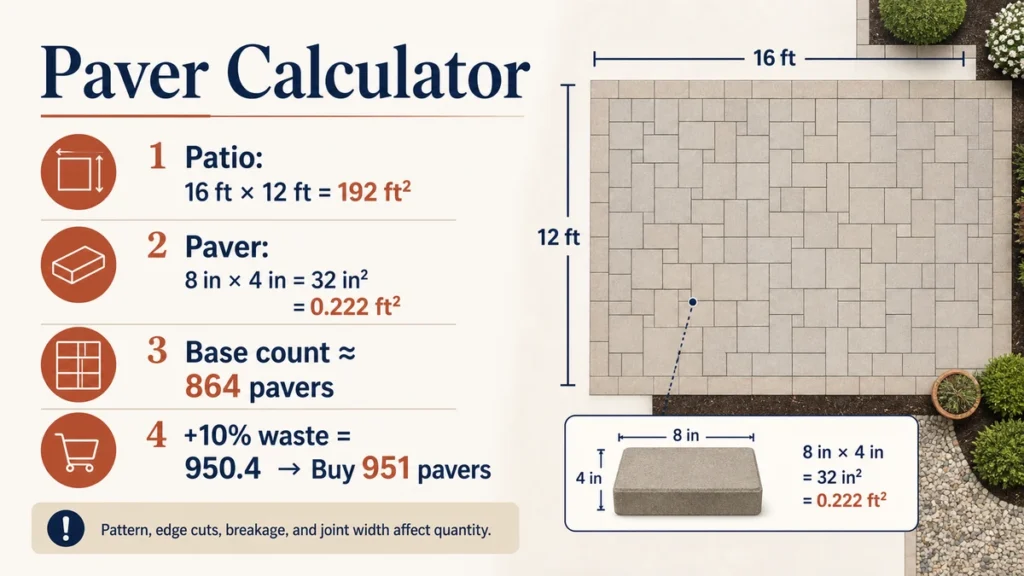
A Paver Calculator helps estimate how many pavers you need for a patio, walkway, courtyard, or other paved area.
Enter the finished project dimensions, the actual paver size, and the planned joint width. The calculator can estimate the base number of units and add an allowance for cuts, breakage, and unusable pieces.
The result is a material-planning quantity. The final order can still change because of layout pattern, borders, curves, package sizes, color blending, and whether cut pieces can be reused.
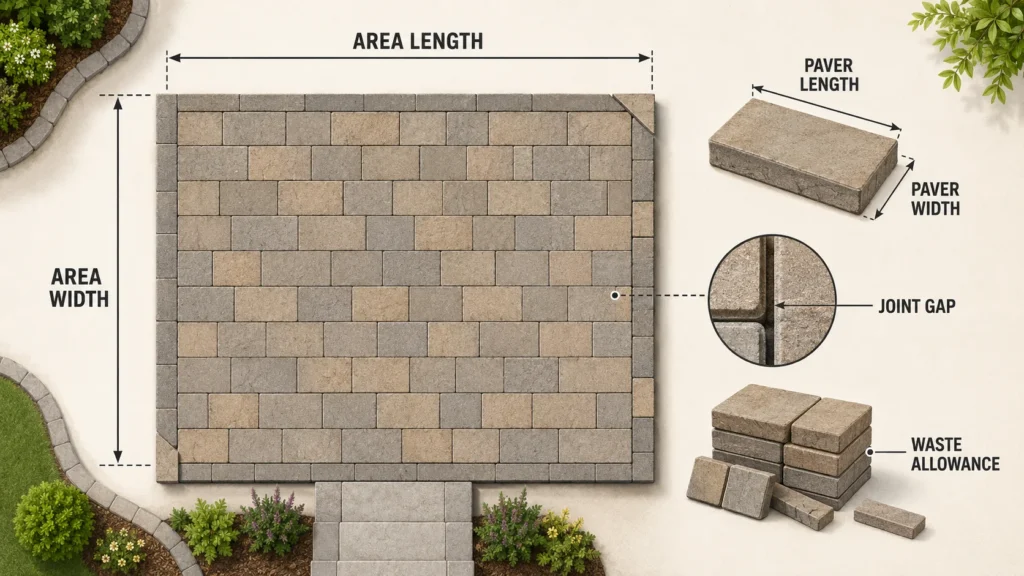
Measure the finished paved area, use the actual paver dimensions, include the intended joint, then add a practical cutting allowance.
Start With the Finished Paved Area
For a simple rectangular patio or walk:
Project area = Length × Width
For example, a patio measuring:
16 ft × 12 ft
has an area of:
192 ft²
That gives you the total surface to be covered.
If the project contains several sections, calculate each one separately and add them.
This is usually easier to check than treating an irregular patio as one oversized rectangle.
How to Use the Paver Calculator
- Measure the finished length and width of the paved area.
- Enter the actual paver dimensions.
- Add the planned joint width.
- Choose the layout or orientation when relevant.
- Enter an allowance for cuts and breakage.
- Calculate the base paver count.
- Review the final count after allowance.
- Round the order according to full bundles, layers, pallets, or other supplier packaging.
If borders or accent bands use a different paver, calculate them separately.
Actual Paver Size Matters
A paver described as:
6 × 9 inches
may not measure exactly 6 by 9 inches on the face.
Some products are sold using nominal dimensions that assume a joint or spacer arrangement.
Use the manufacturer’s technical sheet or measure an actual unit whenever layout accuracy matters.
A small difference repeated across many rows can noticeably change the edge cuts.
Keep Everything in One Unit System
Do not combine feet, inches, and millimetres directly.
For example, if the project is measured in feet but the paver is measured in inches, convert one set before calculating.
Useful conversions include:
1 ft = 12 in
and:
1 in = 25.4 mm
A 3 mm joint cannot simply be added to an 8-inch paver without converting one of the values.
How Joint Width Enters the Layout
For a straight layout, each repeating section includes the paver plus the joint beside it.
A practical directional formula is:
Pavers along one side = ceiling((Project dimension + Joint width) ÷ (Paver dimension + Joint width))
The added joint in the numerator corrects for the fact that a row of several pavers has joints between units, not after the final outside edge.
The calculator can handle this automatically.
For a quick area estimate, the paver-and-joint module can also be approximated as:
Module area ≈ (Paver length + Joint) × (Paver width + Joint)
But the directional method is usually more useful when partial edge pieces matter.
Area Count and Layout Count Are Not Always the Same
A simple area calculation answers:
“How many paver-sized areas fit into the project area?”
A layout calculation asks:
“How many complete paver positions are required along each direction?”
Those can give slightly different answers.
For example, if a patio needs:
20.2 pavers along one side
you still need material for:
21 paver positions
because the final 0.2 position requires a cut from another paver.
That is why directional rounding can produce a more practical base quantity than area alone.
Worked Patio Example
Suppose a patio measures:
16 ft × 12 ft
Total area:
16 × 12 = 192 ft²
Now suppose the chosen paver-and-joint module covers approximately:
0.25 ft²
The area-based count is:
192 ÷ 0.25 = 768 pavers
If you add:
7% allowance
then:
768 × 1.07 = 821.76
Round upward:
822 pavers
| Step | Result |
|---|---|
| Patio area | 192 ft² |
| Approximate module area | 0.25 ft² |
| Base count | 768 pavers |
| Allowance | 7% |
| Calculated total | 821.76 |
| Planning quantity | 822 pavers |
If the supplier sells only full layers or pallets, the purchase quantity may need to be rounded upward again.
Why the Pattern Changes the Quantity
A simple running bond on a rectangular patio usually produces fewer awkward cuts than a diagonal or highly patterned layout.
Patterns may include:
- running bond;
- stack bond;
- basketweave;
- herringbone;
- diagonal layouts;
- circular patterns;
- multi-size modular patterns; and
- bordered fields.
Each creates a different cutting pattern.
The calculator can estimate a base quantity, but the final allowance should reflect the layout you actually plan to install.
Pattern Complexity at a Glance
| Layout Condition | Typical Cutting Complexity |
|---|---|
| Straight rectangular field | Lower |
| Running bond | Low to moderate |
| Many doorways or corners | Moderate |
| Diagonal field | Higher |
| Herringbone | Higher |
| Circular or fan pattern | Higher |
| Multi-size modular pattern | Depends on bundle mix |
| Borders and contrasting bands | Higher |
This is not a fixed waste chart.
The actual allowance depends on the project geometry, paver size, cutting method, installer experience, and whether usable offcuts can be reused.
Borders Should Be Counted Separately
A border is not simply extra waste.
If a patio has:
a field paver
plus:
a soldier-course border
the border has its own quantity.
A good approach is:
- calculate the border run;
- determine how many border units are needed;
- calculate the field inside that border;
- add the two quantities;
- then apply the appropriate allowance to each where needed.
This prevents the border from being hidden inside a generic waste percentage.
Soldier Courses Change the Field Dimensions
Suppose the border is one paver wide around the entire patio.
The field area inside the border is now smaller than the full patio area.
Calculate:
Full patio
then:
Border
then:
Remaining field
rather than counting the whole patio as field pavers and adding border pavers on top.
Otherwise, material can be double-counted.
Multi-Size Patterns Need the Correct Ratio
Some paver systems are sold as bundles containing several sizes.
For example, one pattern may require:
40% small units
35% medium units
25% large units
The actual bundle may already be designed to produce that pattern ratio.
Do not divide the project area equally among the three paver sizes unless the manufacturer specifies that approach.
Use the manufacturer’s pattern chart and bundle mix.
Packaging Can Control the Final Order
Pavers may be sold as:
- individual units;
- full layers;
- bundles;
- pallets; or
- mixed-size packages.
Suppose you need:
822 pavers
but a pallet contains:
120 pavers
Then:
822 ÷ 120 = 6.85 pallets
If the supplier sells full pallets only, you may need:
7 pallets
If individual pieces or partial layers are available, the order may be adjusted differently.
Always check how the product is actually sold.
Curves Create More Cutting
A curved patio edge can use more material than a straight edge even if the covered area is similar.
Curves often require:
- many small cuts;
- more rejected pieces;
- additional layout work; and
- more opportunities for breakage.
Do not rely only on area when the project has:
- circular edges;
- sweeping curves;
- rounded steps; or
- curved planting cutouts.
Sketch the edge and review the likely cutting pattern.
Small Obstacles Do Not Always Save Pavers
A post or drain may reduce the area technically covered by pavers.
But cutting around it may still consume a full unit.
For example, a narrow post in the center of one paver location does not necessarily save one paver.
The surrounding piece may simply need a cutout.
Subtract large exclusions where the reduction is meaningful.
Treat small penetrations as layout conditions rather than automatic area deductions.
Large Openings Can Be Calculated Separately
If the patio surrounds:
- a large planting bed;
- a pool;
- a substantial permanent structure; or
- another clearly defined opening,
subtracting that area may be appropriate.
For accurate ordering, also check whether the opening creates extra border cuts around its perimeter.
Removing area and increasing cutting complexity can happen at the same time.
Paver Thickness Is Not Part of the Surface Count
Two pavers can have the same face dimensions but different thicknesses.
The surface count may be identical.
Their suitability may not be.
Product thickness can matter for:
- pedestrian use;
- driveways;
- vehicle loads;
- freeze-thaw conditions;
- edge restraint; and
- manufacturer system requirements.
The calculator estimates how many surface units are needed.
It does not select the correct paver thickness for the application.
The Base Is a Separate Calculation
The visible pavers are only the top layer of the pavement system.
A typical project may also involve:
- excavation;
- aggregate base;
- bedding layer;
- geotextile;
- edge restraint;
- drainage;
- jointing material; and
- compaction.
These have their own dimensions and material requirements.
Do not derive aggregate-base quantity directly from the paver count.
Use the Gravel Calculator when you need to estimate aggregate volume separately.
Drainage and Slope Come Before Quantity
A patio that contains the right number of pavers can still fail if water has nowhere to go.
Before ordering, confirm:
- finished elevations;
- drainage direction;
- slope;
- relationship to doors;
- relationship to foundations; and
- nearby drains or landscaping.
The paver count does not determine the correct site slope or drainage design.
Edge Restraints Are Part of the System
Pavers at the perimeter generally need an appropriate restraint system.
The amount of edge restraint depends on perimeter length rather than surface area.
A 200 ft² square patio and a narrow 200 ft² walkway can have very different perimeter lengths.
Calculate edge restraint separately.
Joint Material Is Also Separate
The paver count tells you how many units cover the surface.
It does not automatically calculate the amount of:
- joint sand;
- polymeric sand;
- permeable aggregate; or
- other joint material.
Joint-material quantity can depend on:
- joint width;
- joint depth;
- paver dimensions; and
- product type.
Use the manufacturer’s coverage information.
Keep Spare Pavers for Repairs
Holding onto a few matching pavers after installation can be useful.
Future repairs may require replacement after:
- staining;
- cracking;
- utility work;
- edge movement; or
- accidental damage.
Later batches may differ slightly in:
- color;
- texture;
- surface finish; or
- dimensions.
Spare units from the original lot can make repairs easier to match.
Color Blending Can Matter During Installation
Manufactured pavers can show natural or intentional color variation between units or pallets.
For blended-color products, installers may pull from several bundles at the same time to avoid creating obvious patches.
Check the product instructions for recommendations about blending.
Quantity planning should also account for whether matching material must come from the same production run.
Common Paver Calculation Mistakes to avoid
Using Nominal Dimensions as Exact Dimensions
Check the manufacturer’s actual dimensions.
Ignoring Joint Width
The joint affects the repeating layout module.
Mixing Units
Convert feet, inches, centimetres, or millimetres before calculating.
Using Only Area Division
Partial rows and columns can increase the practical unit count.
Deducting Every Small Obstruction
Small cutouts often do not save complete pavers.
Treating a Border as Waste
Calculate special border courses separately.
Ignoring the Pattern
Diagonal and multi-size layouts need different planning.
Rounding Before Adding Allowance
Calculate the base count first, apply the allowance, then round.
Ignoring Supplier Packaging
The final purchase may need to match full bundles or pallets.
Assuming Base Material Is Included
The paver count covers the visible units only.
Before Ordering Pavers
A final order check should include:
Project dimensions
Have the finished edges been measured?
Product dimensions
Are the paver dimensions actual rather than nominal?
Joint width
Does the value match the manufacturer’s recommendation?
Pattern
Is the field straight, diagonal, herringbone, modular, or bordered?
Special courses
Have borders and bands been counted separately?
Allowance
Does it match the likely cuts and breakage?
Packaging
Are you buying pieces, layers, bundles, or pallets?
Color and lot
Will all material come from compatible production runs?
Site preparation
Are base, drainage, and edge restraint being planned separately?
Related Project Calculators
Use the Gravel Calculator for aggregate base or drainage material.
The Concrete Calculator can help estimate concrete slabs or pads.
For planting beds and landscape cover around the paved area, use the Mulch Calculator.
FAQ
How do I calculate how many pavers I need?
Measure the finished area, enter the paver dimensions and joint width, calculate the base count, then add an appropriate cutting allowance.
Round the final quantity upward.
Does joint width reduce the number of pavers?
It slightly increases the repeating module between units.
However, partial edge rows and the chosen layout still control the practical purchase quantity.
Should I use actual or nominal paver dimensions?
Use the actual dimensions from the manufacturer whenever possible.
Nominal size may include a joint or spacer convention.
How much waste should I add?
There is no universal percentage.
Simple rectangular layouts generally need less extra material than diagonal, curved, herringbone, or highly cut projects.
Can broken pavers be included in the waste allowance?
Yes.
Allowance can cover cuts, breakage, dimensional variation, and unusable pieces.
Should I subtract posts and drains?
Not automatically.
Small obstacles can create cuts without saving a full paver.
Subtract only meaningful exclusions.
Does the calculator include border pavers?
Only if they are entered as part of the calculation.
Special border courses are usually clearer when calculated separately.
Can I calculate a herringbone pattern?
The calculator can estimate the base material quantity, but layout-specific waste and package mix should be checked separately.
Does the result include base material?
No.
Aggregate base, bedding, edge restraint, and joint material require their own calculations.
Should I keep spare pavers?
Keeping a few matching units from the original production run can make future repairs easier.
Technical Resource
For technical information about concrete paver systems, installation, design, and hardscape practices, see:
Concrete Masonry & Hardscapes Association — Technical Resources
Always follow the product manufacturer’s instructions and project-specific requirements for base preparation, jointing, edge restraint, drainage, and load conditions.
Count the Pattern, Not Just the Patio
A Paver Calculator can tell you how many units appear to fit into a measured surface.
The actual order depends on how those units are arranged.
A straight patio, a herringbone walkway, and a curved bordered courtyard can have the same square footage but very different cutting requirements.
Measure the finished boundaries, use the actual paver dimensions, include the intended joint, separate borders and pattern components, and then add a realistic allowance.
That produces a much more useful order than relying on square footage alone.