

Fence Calculator
Estimate fence panels or sections, posts, rails, net fence length, waste allowance, and optional material cost for straight runs or closed perimeter fencing.
Results
This estimate is for planning only. Real fence material needs can vary because of corners, slopes, gate posts, terminal posts, bracing, uneven terrain, fence style, local code, and manufacturer panel dimensions.
A Fence Calculator helps estimate how many fence sections, posts, rails, or panels are needed along a measured route.
Enter the total fence length, gate openings, and the actual panel width or planned post spacing. The calculator can then estimate the basic number of sections and post positions for an open run or closed layout.
The result is a material-planning estimate. Corners, gates, slopes, terminal posts, bracing, property boundaries, underground utilities, and product-specific installation requirements still need to be checked separately.
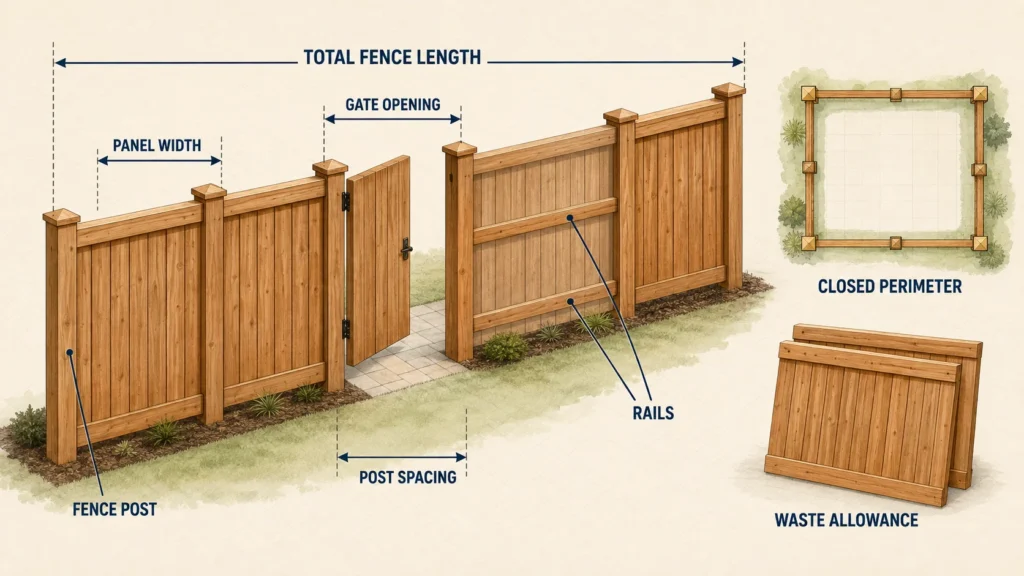
Measure the actual fence route, subtract gate openings from panel coverage, and use the dimensions of the fence system you plan to install.
Start with the fence line, not the property area
A fence is measured along its route.
Do not calculate fencing from the square footage of the property.
Instead, mark:
- starting points;
- endpoints;
- corners;
- gates;
- changes in direction;
- changes in fence type; and
- major changes in grade.
Measure each straight segment and add them together.
For example, if three fence runs measure:
42 ft
36 ft
and:
28 ft
then the total route is:
42 + 36 + 28 = 106 ft
That is the distance the fence materials need to cover before accounting for gate openings.
How to use the Fence Calculator
- Measure every straight section of the planned fence.
- Add those lengths to find the total route.
- Enter the combined width of any gates.
- Enter the actual fence panel width or intended maximum post spacing.
- Select whether the layout is an open run or a closed loop if the tool provides that option.
- Calculate the estimated number of fence sections.
- Review the basic post count.
- Add special corner, gate, terminal, transition, or brace posts separately where required.
Do not order directly from the basic post number until the actual fence layout has been drawn.
Subtract gate openings before counting fence sections
A gate occupies part of the fence route, but ordinary fence panels do not cover that opening.
Use:
Net fenced length = Total fence route − Total gate width
Then:
Fence sections = ceiling(Net fenced length ÷ Section width)
For example:
Total route = 104 ft
Gate opening = 4 ft
So:
Net fenced length = 104 − 4 = 100 ft
If the maximum section width is:
8 ft
then:
100 ÷ 8 = 12.5
Round upward:
13 sections
You cannot normally build half of a complete fence bay without adjusting the layout, so the result rounds to a whole section.
Worked fence example
Suppose you have an open fence run with these inputs:
| Item | Measurement |
|---|---|
| Total route | 104 ft |
| Gate opening | 4 ft |
| Net fenced length | 100 ft |
| Maximum section width | 8 ft |
| Calculated sections | 12.5 |
| Planning sections | 13 |
A simple open run of 13 sections would normally create:
14 basic post positions
before adding or adjusting for the gate configuration.
The actual gate may need separate hinge and latch posts, so the final post count can be different.
Why sections plus one does not always equal the final post count
For a simple straight fence with no gates or special conditions:
Posts = Sections + 1
So:
10 sections → 11 posts
That relationship works because adjacent sections share posts.
Real fence layouts often contain more than simple line posts.
For example, you may need:
- end posts;
- corner posts;
- gate posts;
- terminal posts;
- brace posts;
- transition posts; or
- heavier posts at changes in fence type.
That is why the calculator should treat the basic count as the starting point rather than the final order.
Open runs and closed loops behave differently
An open fence has two endpoints.
For example:
Section — Post — Section — Post
and so on until the final endpoint.
A closed loop has no open endpoint because the last section returns to the starting point.
As a result, a simple closed loop may use roughly the same number of basic shared post positions as fence sections.
But corners and gates can still require special posts.
Use the site layout rather than applying one post formula to every project.
Separate post types before ordering
A useful fence takeoff usually keeps post types separate.
| Post type | Typical purpose |
|---|---|
| Line post | Supports ordinary straight fence sections |
| End post | Terminates an open fence run |
| Corner post | Handles a change in direction |
| Gate post | Supports gate hinges or latch hardware |
| Terminal post | Ends a tensioned or specialized fence system |
| Brace post | Adds support where the fence system requires it |
| Transition post | Handles a change in fence height or type |
The exact categories depend on the fence system.
A wood privacy fence, vinyl panel fence, ornamental fence, and chain-link fence do not necessarily use the same post details.
Use the actual panel width
Do not assume every fence panel is exactly:
6 ft
or:
8 ft
A product advertised as an 8-foot panel may have an actual installed width that differs slightly because of:
- post dimensions;
- brackets;
- manufacturing tolerances;
- joint spacing; or
- product design.
Use the manufacturer’s installed dimensions when available.
Across a long fence, even a small difference per section can noticeably change the final bay.
Site-built fences work differently from prefabricated panels
Prefabricated fence panels come in fixed sizes.
A site-built fence may use rails and individual boards installed between posts.
This can make the layout more flexible.
For example, a site-built fence can often use bays such as:
7 ft 6 in
7 ft 8 in
or:
7 ft 10 in
to balance the entire run.
A rigid 8-foot panel cannot necessarily be shortened or stretched in the same way.
Enter the dimensions for the fence system you actually intend to install.
Balance the sections instead of leaving one tiny bay
Suppose the net fence length is:
50 ft
and you are planning roughly:
8 ft bays
A simple division gives:
50 ÷ 8 = 6.25
You could build six full 8-foot bays and leave one:
2-foot bay
but that may look awkward.
Instead, divide the full length across seven more balanced bays:
50 ÷ 7 ≈ 7.14 ft
Each bay becomes roughly:
7 ft 2 in
depending on the final post layout.
Balanced spacing often looks better than one extremely narrow closing section.
Gates change more than the covered length
A gate opening removes fence-panel width, but it also creates special structural points.
A typical gate may need:
hinge post
and:
latch post
These may need to be larger or installed differently from ordinary line posts.
A wide or heavy gate may require:
- heavier posts;
- deeper footings;
- bracing;
- specific hardware; or
- additional clearance.
Do not simply subtract the gate width and forget the gate structure.
Gate width should be the actual opening
Suppose the planned gate is described as:
4 ft wide
Confirm whether that means:
4 ft leaf width
or:
4 ft clear opening
The required post spacing may be slightly different depending on:
- hinges;
- latch hardware;
- clearance;
- gate frame; and
- manufacturer instructions.
Use the actual required gate opening in the layout.
Corners divide the route into separate runs
A fence with several corners should be laid out section by section.
For example:
Run A = 32 ft
Run B = 48 ft
Run C = 27 ft
Do not always combine them into one:
107 ft straight run
and divide by panel width.
Each run has its own endpoints and may require its own section spacing.
A corner post is shared by two runs, but the bay layout on each side still needs to fit independently.
Sloped ground changes the installation
A sloping site can be handled in different ways depending on the fence type.
Two common approaches are:
Racked fence
and:
Stepped fence
Racked fence
The panel or rails follow the slope.
This can reduce large gaps under the fence, but the product must be able to rack within its stated limits.
Stepped fence
Each section stays level and changes elevation at the posts.
This creates a stair-step appearance and may leave triangular gaps beneath sections.
The same measured route can produce different:
- post heights;
- cuts;
- gaps;
- panel use; and
- visual results
depending on the method.
Check the slope before buying fixed panels
Some manufactured fence panels can rack only a limited amount.
If the slope is too steep, the panel may not follow the grade properly.
Before ordering:
- measure the horizontal run;
- measure the vertical change;
- calculate or estimate the slope;
- check the manufacturer’s rack limit.
If the panel cannot accommodate the slope, the layout may need stepping or another fence system.
Panel count does not tell you post length
The required post length depends on more than fence height.
You may need to account for:
- embedment depth;
- frost conditions;
- soil;
- post footing;
- fence height;
- wind loading;
- slope;
- gate loads; and
- local construction requirements.
A six-foot fence does not automatically mean you buy six-foot posts.
Concrete is a separate estimate
If posts are set in concrete, calculate that material separately.
Concrete quantity may depend on:
- hole diameter;
- hole depth;
- post dimensions;
- number of posts;
- soil conditions; and
- installation method.
Use the Concrete Calculator once the required footing dimensions are known.
Do not derive concrete quantity only from fence length.
Fence rails need their own count
For site-built fences, rails run horizontally between posts.
Suppose each bay uses:
3 rails
and the fence has:
12 bays
Then:
12 × 3 = 36 rail runs
But the lumber quantity depends on the actual bay lengths and available rail stock.
If each rail must span between posts, section spacing becomes part of the lumber takeoff.
Boards or pickets are another calculation
A wood fence may also require individual boards or pickets.
Their quantity can depend on:
- board width;
- spacing;
- overlap;
- fence length;
- pattern; and
- gate construction.
A panel-based calculator may not estimate individual pickets accurately unless those inputs are included.
Keep panel count and board count separate.
Do not subtract every post or obstruction from the fence length
A utility pole, tree, or other obstacle may affect the route, but it does not necessarily reduce the required fencing by its exact width.
The fence may:
- bend around it;
- terminate beside it;
- require extra posts;
- use a custom opening; or
- need clearance.
Treat obstacles as layout features, not automatic length deductions.
Property lines are not determined by the calculator
A material estimate does not tell you where the legal boundary is.
If the fence is near a property line and the boundary is uncertain, use appropriate survey information or professional boundary verification.
A measurement taken from an existing fence, hedge, driveway, or online map is not necessarily a legal property-line determination.
Setbacks and height limits can change the route
Local rules can affect:
- how close the fence may be to the property line;
- maximum fence height;
- corner visibility;
- front-yard fences;
- pool barriers;
- easements; and
- gate placement.
A route that looks correct from the site dimensions may need to move after zoning or permit requirements are checked.
Confirm those rules before ordering large quantities of material.
Underground utilities need to be located before digging
Post holes can interfere with buried services such as:
- electricity;
- gas;
- communications;
- water;
- sewer; or
- other utilities.
In the United States, the 811 system provides the starting point for requesting utility marking before excavation.
Local procedures and required waiting periods vary.
Do not begin digging simply because the fence material calculation is complete.
Retaining walls need special care
A fence installed near or on top of a retaining wall can involve structural and setback issues that a normal fence calculator does not address.
Do not assume the same post-hole depth or footing detail used in open soil will work beside a retaining wall.
The wall, fence load, drainage, and connection may need separate design review.
Wind exposure can change the post requirements
A solid privacy fence catches much more wind than an open fence.
Wind load can affect:
- post size;
- spacing;
- footing size;
- connection hardware; and
- fence height.
A calculator that estimates the number of sections does not determine structural adequacy.
Use the applicable product requirements and local construction rules.
Keep waste component-specific
Different fence materials need different allowances.
For example:
Rails
may need extra length for cuts.
Boards
may need extra pieces for defects or trimming.
Panels
may need spares for damage.
Posts
usually should be counted by actual position rather than adding an arbitrary percentage.
Do not add the same waste percentage blindly to every component.
Keep matching material for future repairs
For manufactured fence panels or specialty materials, keeping a small amount of matching material can be useful.
Later production runs may differ in:
- color;
- profile;
- texture; or
- dimensions.
This can matter especially for vinyl, composite, coated metal, or decorative systems.
Common fence calculation mistakes to avoid
Measuring the property area instead of the route
Fence quantity is based on linear fence length.
Forgetting to subtract gate openings
Ordinary fence panels do not cover the gate opening.
Assuming every bay is exactly 8 feet
Balanced layouts often use slightly shorter sections.
Using one generic panel width
Use the actual installed product dimension.
Treating all posts as identical
Corners, gates, and terminals may require different posts.
Ignoring slope
Stepped and racked installations behave differently.
Forgetting the second side of a corner layout
Measure each run separately.
Assuming the calculator locates the boundary
It does not.
Ordering before checking utilities
Post-hole excavation should follow the local utility-location process.
Assuming panel count includes concrete and hardware
Those materials require separate estimates.
Before ordering fence materials
A useful final review looks like this:
Route
Have all fence segments been measured along the actual line?
Gates
Are all clear openings included?
Corners
Has each run been laid out separately?
Sections
Are widths balanced instead of leaving one tiny closing bay?
Posts
Are line, end, corner, gate, and special posts counted separately?
Slope
Will the fence rack or step?
Product
Are actual panel dimensions and installation requirements confirmed?
Site
Have property rules, easements, and underground utilities been checked?
Extra materials
Are rails, hardware, concrete, caps, fasteners, and other components estimated separately?
Related outdoor calculators
Use the Concrete Calculator to estimate post-footing concrete after the required hole dimensions are known.
The Decking Calculator can help estimate deck surface material for related outdoor construction.
For lumber volume planning, use the Board Foot Calculator.
FAQ
How do I calculate fence sections?
Subtract gate openings from the total fence route, then divide the remaining length by the planned section width.
Round upward when needed.
How many posts do I need?
For a very simple open straight run, the basic count is often:
Sections + 1
But gates, corners, closed loops, terminals, braces, and transitions can change the final number.
Should gate width be subtracted?
Yes, when calculating ordinary fence-panel coverage.
Count the gate and its posts separately.
Can I use an 8-foot spacing for every fence?
No.
Use the maximum spacing or panel width allowed by the selected fence system and project requirements.
Does the calculator include corner posts?
Only if the layout inputs or calculator features account for them.
It is often clearer to count corners separately from line posts.
How do I calculate fence on a slope?
Measure the actual route and decide whether the installation will rack or step.
Check the product’s slope limitations before ordering.
Should I measure along the ground on a slope?
Follow the measurement method required by the fence system and layout.
For panel spacing, the horizontal run and grade change can both matter.
Does the calculator estimate post-hole depth?
No.
Footing depth and diameter depend on fence type, soil, climate, wind, height, and applicable construction requirements.
Does the calculator locate my property line?
No.
Use reliable survey and local property information when the boundary is uncertain.
Should I contact utility locating before setting posts?
Yes.
In the United States, start with 811 before excavation and follow the local process and waiting period.
Does the fence count include concrete and hardware?
Not unless the tool specifically calculates them.
Concrete, brackets, fasteners, caps, rails, and other components should be estimated separately.
Plan the bays before you buy the panels
A Fence Calculator can turn a measured route into a clean number of sections and basic post positions.
The finished fence still depends on how those sections fit the real site.
Corners break the route into separate runs. Gates need dedicated posts. Slopes change the installation method. One final short bay may look awkward. Property rules and utilities can change where the fence is allowed to go.
Measure the route first, draw the bays, balance the spacing, and identify special posts before placing the material order.
That produces a much more useful estimate than dividing the total property perimeter by a generic panel width.