

Paint Calculator
Estimate how much paint you need for a room using wall dimensions, doors, windows, number of coats, paint coverage, and optional waste allowance.
Results
Paint estimates are approximate. Actual coverage can vary based on paint type, surface texture, primer use, color change, application method, wall condition, and manufacturer coverage rating.
A Paint Calculator helps you estimate how much paint you need for a room without guessing from floor size alone.
It works from the surface that will actually be painted: wall length, wall height, doors, windows, number of coats, and the coverage rate of the paint you plan to use.
The result is a planning quantity. Real coverage can change depending on the wall surface, paint type, color change, roller or spray method, and how many coats are required.
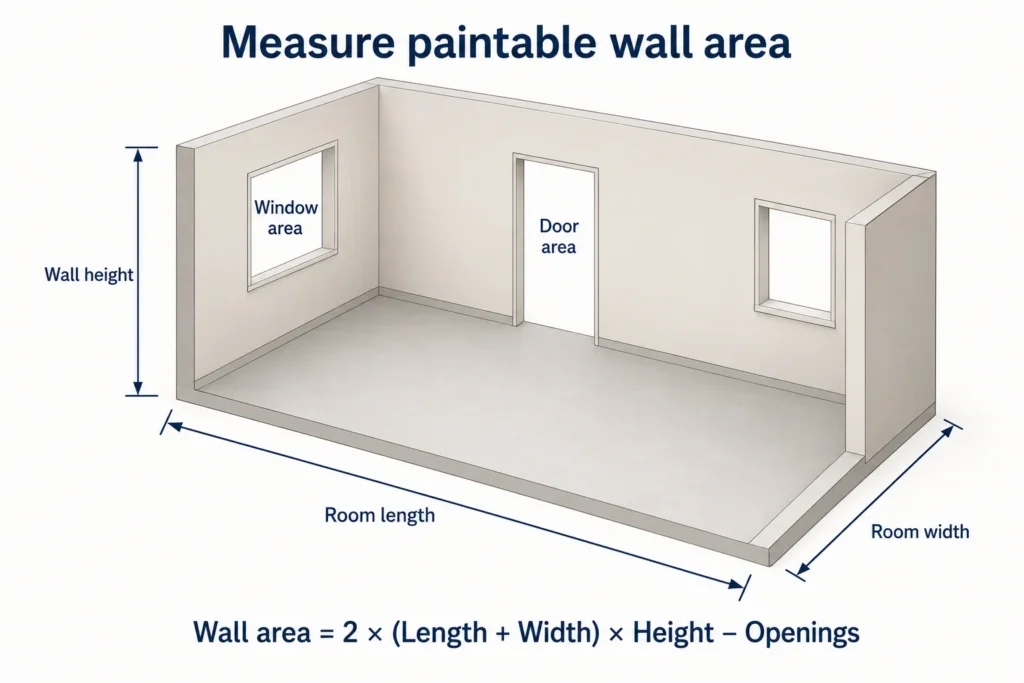
Measure the surfaces you plan to paint, subtract large openings that will stay unpainted, and use the coverage printed on the actual paint product.
Start With the Walls, Not the Floor
For a normal rectangular room, the easiest way to estimate wall area is to use the room perimeter.
First calculate the perimeter:
Perimeter = 2 × (Room length + Room width)
Then multiply by wall height:
Gross wall area = Perimeter × Wall height
Or in one formula:
Gross wall area = 2 × (Length + Width) × Height
This gives the total wall surface before subtracting doors, windows, or other areas that will not be painted.
How to Use the Paint Calculator
Measure the room first, then enter the values into the calculator.
- Enter the room length.
- Enter the room width.
- Enter the wall height.
- Add doors and windows that will not be painted.
- Choose the number of coats.
- Enter the coverage rate of the paint you plan to use.
- Calculate the required paint quantity.
- Add a practical allowance if the project needs one.
- Round the purchase quantity to the can sizes actually available.
If the room is irregular, measure each wall separately rather than forcing it into a simple rectangle.
Worked Paint Example
Suppose a room measures:
14 ft long
12 ft wide
with:
8 ft walls
The gross wall area is:
2 × (14 + 12) × 8
= 416 ft²
Now subtract:
One door = 21 ft²
Two windows = 15 ft² each
Total openings:
21 + 15 + 15 = 51 ft²
Net wall area:
416 − 51 = 365 ft²
If two coats are needed:
365 × 2 = 730 coated ft²
If the paint covers:
350 ft² per gallon
then:
730 ÷ 350 ≈ 2.09 gallons
| Step | Result |
|---|---|
| Gross wall area | 416 ft² |
| Door and window area | 51 ft² |
| Net wall area | 365 ft² |
| Two-coat coverage needed | 730 ft² |
| Paint coverage | 350 ft²/gal |
| Calculated paint needed | About 2.09 gal |
The mathematical result is about 2.09 gallons. The final purchase depends on available container sizes and any allowance you decide to include.
Why Two Coats Double the Coverage Area
The physical wall area does not change when you apply another coat.
But the paint still needs to cover the same wall a second time.
If the net wall area is:
365 ft²
then:
One coat = 365 coated ft²
Two coats = 730 coated ft²
Three coats = 1,095 coated ft²
This is why coat count should be entered separately from room size.
Use the Coverage Printed on the Can
A generic paint-coverage figure can be useful for rough planning, but the actual product label should control the final estimate.
Different paints can cover differently because of:
- formulation;
- sheen;
- surface porosity;
- texture;
- application method;
- color change;
- primer use; and
- whether the surface is already sealed.
If one product says:
350–400 ft² per gallon
and another says:
250–300 ft² per gallon
the same room may require a different amount of paint.
Enter the coverage for the exact product you plan to buy.
New Drywall Can Use More Paint
Fresh drywall can absorb more coating than a previously sealed and painted wall.
The same may be true for:
- bare plaster;
- masonry;
- porous repairs;
- unfinished wood; or
- patched areas.
A first coat on an absorbent surface may not reach the same coverage as a later coat.
This is one reason primer and finish paint should be treated separately.
Primer Is Not Just Another Coat of Finish Paint
Primer may have a different coverage rate from the wall paint.
It can also be needed only on certain surfaces.
For example, primer may be used on:
- bare drywall;
- repaired areas;
- stains;
- glossy surfaces;
- strong color changes; or
- problem substrates.
Run the calculation separately for primer.
Then calculate the finish paint using its own coat count and coverage rate.
This avoids treating leftover primer as though it can replace finish paint.
Keep Different Paint Jobs Separate
A room may use several different products.
| Surface | Typical Separate Calculation |
|---|---|
| Walls | Wall paint |
| Ceiling | Ceiling paint |
| Trim | Trim enamel |
| Doors | Door or trim paint |
| Accent wall | Separate color/product |
| Primer | Primer coverage and coat count |
Mixing all of these into one number can create a misleading estimate because each product may have a different coverage rate.
Does the Ceiling Count Automatically?
No.
A wall calculation covers the walls only.
For a rectangular ceiling:
Ceiling area = Room length × Room width
For a 14 ft by 12 ft room:
14 × 12 = 168 ft²
If the ceiling uses a different paint from the walls, calculate it separately.
Should Doors and Windows Always Be Subtracted?
Not necessarily.
For a more exact estimate, large unpainted openings should be deducted.
However, painters sometimes leave small openings in the total because the unused area provides a small practical allowance for:
- roller loading;
- brush work;
- minor measurement errors; and
- touch-ups.
The important thing is consistency.
Do not subtract every tiny opening and then add a very large waste allowance without understanding what each adjustment is doing.
Measure Irregular Rooms Wall by Wall
The perimeter formula works well for a simple rectangular room.
For an irregular space, measure each wall separately.
For example:
Wall 1: 12 ft × 8 ft
Wall 2: 10 ft × 8 ft
Wall 3: 7 ft × 8 ft
and so on.
Calculate each wall area and add the results.
This is often more reliable than trying to estimate one average room length and width.
Accent Walls Should Be Separated
Suppose three walls are painted white and one wall is painted blue.
Do not combine all four walls into one paint quantity if the colors are purchased separately.
Calculate the blue wall on its own.
Then calculate the remaining walls with the white paint.
This gives you a more useful purchase estimate for each product.
Texture Can Change Real Coverage
A heavily textured wall has more actual surface area than a smooth flat wall.
Examples include:
- textured plaster;
- rough masonry;
- brick;
- stucco;
- heavily textured drywall; and
- uneven block walls.
Paint may also settle into recesses and use more material.
For rough surfaces, rely on product guidance and project experience rather than assuming smooth-wall coverage will apply exactly.
Strong Color Changes May Need More Coats
Painting a light neutral over a similar color may cover relatively easily.
Changing:
dark red → white
or:
deep blue → pale cream
may require additional preparation, primer, or extra finish coats.
The calculator does not know how easily one color will hide another.
Choose the coat count based on the actual surface and product rather than assuming every repaint takes the same number of coats.
Application Method Affects Usage
Paint can be applied with:
- roller;
- brush;
- sprayer; or
- a combination.
Each method has different practical losses.
Spraying, for example, can involve overspray.
Brush and roller work can leave paint in:
- trays;
- sleeves;
- brushes; and
- containers.
The product’s rated coverage gives a useful baseline, but actual use may differ.
How Much Extra Paint Should You Allow?
There is no single allowance that fits every room.
A simple, smooth rectangular room with accurate measurements may need only a small margin.
More complex work may justify additional paint because of:
- rough surfaces;
- many corners;
- repairs;
- irregular walls;
- overspray;
- difficult access; or
- future touch-ups.
Apply the allowance after estimating the main quantity.
Then round according to actual package sizes.
Do Not Buy Based on Decimal Gallons Alone
Suppose the calculator gives:
2.09 gallons
You probably cannot buy exactly 2.09 gallons.
The practical purchase may involve:
- two one-gallon cans plus a quart;
- three gallons;
- another available package combination.
What makes sense depends on:
- container sizes;
- expected touch-ups;
- return policy;
- price differences; and
- whether the same paint will be used elsewhere.
The calculator gives a quantity estimate. The store packaging determines how that estimate turns into a purchase.
Keep Paint From Different Areas Organized
For a multi-room project, keep a simple paint schedule.
For example:
Bedroom 1 — 520 coated ft² — 2 coats — Warm White
Bedroom 2 — 430 coated ft² — 2 coats — Warm White
Hallway — 280 coated ft² — 2 coats — Warm White
If all three use the exact same product and color, their requirements can be combined.
Keep separate lines for:
- primer;
- ceiling paint;
- trim paint;
- accent colors; and
- different sheen levels.
This makes it easier to see where the total came from.
Save the Product Information for Touch-Ups
A future touch-up is easier when you know exactly what was used.
Keep a note of:
- manufacturer;
- product line;
- color name;
- color code;
- sheen;
- base;
- purchase date; and
- batch or tint information where useful.
Two paints with similar color names may not match once they are on the wall.
Common Paint Calculation Mistakes to avoid
Using Floor Area as Wall Area
A 150 ft² room does not automatically have 150 ft² of wall.
Use the wall perimeter and height.
Forgetting the Number of Coats
Two coats require roughly twice the coated area of one coat.
Mixing Primer and Finish Paint
Calculate them separately.
Using a Generic Coverage Rate
Use the coverage printed for the actual product whenever possible.
Subtracting Openings That Will Be Painted
If the door itself will receive paint, do not remove its area from that product’s calculation.
Forgetting High Walls
A room with 10 ft ceilings needs more wall paint than the same floor plan with 8 ft walls.
Combining Different Colors Into One Quantity
Separate accent walls and rooms that use different products.
Rounding Down Too Early
Keep the calculated amount until allowances and package sizes are considered.
Related Surface Calculators
Use the Room Size Calculator when you need to calculate floor, wall, or ceiling dimensions first.
The Wallpaper Calculator can help estimate wall coverings instead of paint.
If you have several doors and windows to subtract, use the Door and Window Area Calculator to calculate those openings separately.
FAQ
How do I calculate wall area for paint?
For a rectangular room:
Wall area = 2 × (Length + Width) × Wall height
Then subtract the area of large doors and windows that will not be painted.
Does the Paint Calculator include the ceiling?
Not automatically.
Calculate the ceiling separately using:
Length × Width
unless the tool specifically includes a ceiling option.
How many coats should I enter?
Use the number expected for the actual paint, surface, and color change.
Some projects need one coat, while others may need primer plus two or more finish coats.
Should I subtract windows?
Large unpainted windows can be subtracted.
Very small openings are sometimes left in the estimate as part of a practical allowance.
Why did the first coat use more paint?
Bare or porous surfaces can absorb more paint.
Texture, repairs, strong color changes, and application method can also reduce coverage.
Can I use the same coverage rate for primer?
Not necessarily.
Primer and finish paint can have different coverage rates.
Use the manufacturer’s stated coverage for each product.
How much extra paint should I buy?
That depends on the surface, room complexity, measurement confidence, and whether you want paint left for touch-ups.
Apply a modest project-specific allowance rather than automatically adding a large percentage.
Can I calculate several rooms together?
Yes, if they use the same paint and finish.
Calculate each room accurately, then combine the net coated areas before dividing by coverage.
Does paint coverage stay the same on textured walls?
Not always.
Rough or porous surfaces can use more paint than smooth, sealed walls.
Is the calculated amount exact?
No.
It is an estimate based on dimensions, coat count, and the coverage value entered. Actual use can vary during application.
Safety Note for Older Painted Surfaces
If you are sanding, scraping, cutting, or otherwise disturbing older paint, the job may involve hazards that are unrelated to paint quantity.
For older U.S. homes, review the EPA’s guidance on lead-safe renovation practices before disturbing painted surfaces:
EPA — Renovation, Repair and Painting Program
The calculator estimates paint quantity only. It does not assess lead, ventilation, surface preparation, protective equipment, or other jobsite safety requirements.
Measure the Paintable Surface, Then Check the Product
A Paint Calculator becomes much more useful when the measurements and product information are both realistic.
Measure the walls that will actually be coated.
Subtract meaningful openings.
Keep primer, ceilings, trim, and accent colors separate.
Then use the coverage figure printed on the paint you intend to buy.
The calculation gives you a starting quantity. The surface condition, number of coats, application method, and available container sizes determine what you actually take home from the store.