

Desk Height Calculator
Set your ideal chair, desk, and monitor heights. Real-time updates, unit switching.
Height & Position
Recommended ranges
Quick summary
Step-by-step derivation
- Min = 0.4739 × height − 6.678
- Max = 0.5538 × height − 9.4270
- Range ≈ 60%–65% × height
Ergonomic Setup Guidance
| Guideline | Why It Matters |
|---|---|
| Keyboard and mouse near elbow height, with elbows around 90–110°. | Helps keep shoulders relaxed and reduces reaching. |
| Wrists straight and in line with the forearms. | Helps avoid awkward wrist extension while typing or using a mouse. |
| Chair height adjusted so feet are supported and thighs feel comfortable. | Supports seated posture and reduces pressure behind the knees. |
| Monitor top near or slightly below eye level. | Helps reduce neck bending and uncomfortable viewing angles. |
| For standing work, desk or keyboard surface near standing elbow height. | Supports a neutral standing typing position. |
Use this Desk Height Calculator to estimate a sitting or standing work-surface height from your body height and setup. The number is a starting point: chair height, keyboard thickness, footwear, task type, monitor position, mobility, and personal comfort all influence the final adjustment.
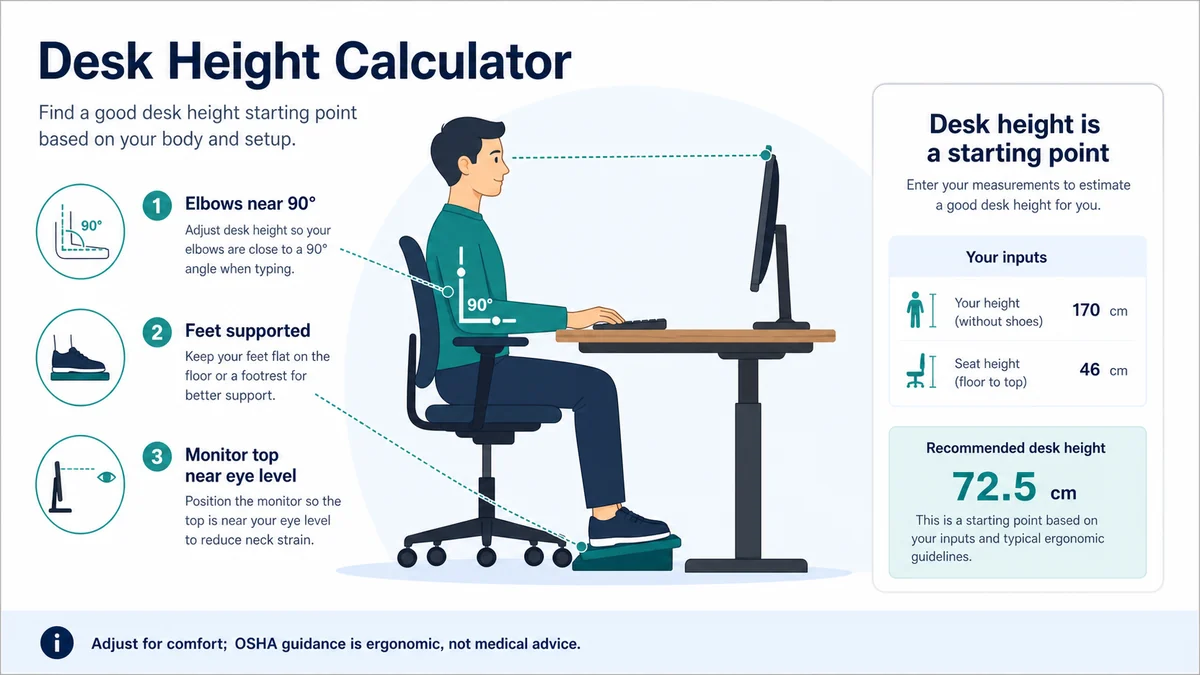
How the Desk Height Calculator works
The Desk Height Calculator is designed to turn body height, working position, and optional chair or keyboard details into an estimated desk-height range and setup cues without making you rebuild the arithmetic each time. Enter the values you know, choose the matching units or options, and calculate. The output is most useful when the inputs describe the same scenario and were measured or recorded at roughly the same level of precision.
The calculator uses anthropometric proportions to estimate elbow height in the selected posture. The work surface is then positioned so the forearms can approach a neutral, supported angle.
Formula and required inputs
Estimated desk height is derived from body-height proportions and adjusted for sitting or standing posture.
Measure body height accurately and choose the posture used most often. For sitting, set the chair and foot support first; for standing, include normal footwear.
Write the units beside the numbers before calculating. That simple check prevents a value in minutes, centimeters, liters, kilograms, miles, or another unit from being treated as if it belonged to a different scale. The calculator handles its displayed conversion options, but it cannot detect a number typed into the wrong field.
Worked example
A calculated value such as 72.5 cm should be tested rather than treated as fixed. Adjust until shoulders relax, elbows stay close to the body, wrists remain near neutral, and feet are supported.
A worked example is a reasonableness test as well as a demonstration. Estimate the likely size of the answer first, run the calculator, and compare. If the calculator returns an order of magnitude you did not expect, look for a misplaced decimal, reversed value, incorrect date, or unit selection before using the result.
How to use this calculator
- Read every field label and decide which values belong to the same calculation.
- Enter measured or documented numbers rather than optimistic guesses.
- Select the correct unit, format, date convention, or calculation mode.
- Calculate and review both the main result and any supporting breakdown.
- Change one input at a time to understand which assumption has the greatest effect.
- Record the inputs with the answer if you need to reproduce or explain it later.
Scenario testing is often more informative than a single result. Try a realistic low value, expected value, and high value for the most uncertain input. The resulting range shows how sensitive the answer is and helps avoid false confidence in a perfectly formatted but assumption-dependent number.
Understanding the result
The desk number only positions the work surface. Monitor height and distance, keyboard placement, chair support, lighting, and movement breaks remain separate decisions.
People with the same standing height can have different leg, torso, and arm proportions. Accessibility needs or pain may require individualized professional assessment.
A calculator cannot correct an inaccurate measurement. Use the same unit throughout, measure the object or body at the stated points, avoid pulling a tape too tight, and repeat the measurement when the result will guide a purchase or a cut.
Accuracy, rounding, and assumptions
A proportion-based estimate cannot replace direct fitting. Adjustable furniture and observation in the real task provide the best refinement.
Round at the end rather than after every intermediate step. For a practical answer, report only as many digits as the least precise input can support. Extra decimals can help with further calculation, but they do not make a rough measurement more certain. When a calculator displays several units, tiny differences can appear because of conversion and rounding.
Also distinguish a mathematical result from a real-world recommendation. A formula describes the relationship among the values entered; it does not automatically account for regulations, product tolerances, professional judgment, comfort, risk, or personal preference. Use the result as a transparent starting point and apply the relevant context.
Common mistakes to avoid
- Setting desk height before adjusting the chair and feet.
- Raising the shoulders to reach a surface that is too high.
- Using the monitor stand to determine keyboard height.
- Rounding an intermediate value too aggressively and carrying that error forward.
- Copying the result without saving the input units, date, rate, or assumptions.
When an answer looks wrong, reset the form and re-enter the values slowly. Confirm the direction of each ratio or time interval, and perform a quick reverse check if possible. For example, multiply a per-unit result by the quantity, add the calculated duration to the start time, or substitute the result back into the original formula.
Practical uses
Use it when setting up a home office, comparing adjustable-desk ranges, switching between sitting and standing, or troubleshooting an awkward posture.
Related calculators
Continue the calculation with Reading Time Calculator, Words Per Minute Calculator, Body Shape Calculator. Related tools can provide a useful cross-check, but use the same definitions and units across the calculations.
Authoritative references
The explanation and cautions above are aligned with OSHA computer workstation guidance, OSHA good working positions. These references provide definitions, measurement conventions, safety information, or planning context; the calculator remains an independent educational tool.
Frequently asked questions
What does the Desk Height Calculator calculate?
Desk Height Calculator converts body height, working position, and optional chair or keyboard details into an estimated desk-height range and setup cues. It applies the stated formula consistently and is useful for checking hand calculations. The result should still be interpreted in context because the tool cannot observe conditions that were not entered.
What formula does the Desk Height Calculator use?
Estimated desk height is derived from body-height proportions and adjusted for sitting or standing posture. The calculator performs the unit conversions needed for the selected options, then rounds the displayed answer. Keeping every input in a compatible unit is essential; mixing units without conversion is a common reason for an implausible result.
How accurate is the Desk Height Calculator?
A proportion-based estimate cannot replace direct fitting. Adjustable furniture and observation in the real task provide the best refinement. Numerical precision does not guarantee real-world accuracy. Recheck the inputs, assumptions, and units, especially when the answer will affect safety, health, cost, material ordering, or a firm schedule.
Can I use different units?
Use any units offered by the calculator, but match each number to its unit selector. If a needed unit is not available, convert it first and keep more precision than you expect to report. Convert the final answer only after the core calculation whenever possible.
Why is my result different from another calculator?
Another tool may use a different convention, default value, rounding rule, calendar rule, or definition. Compare the formulas and assumptions before deciding that either answer is wrong. A small difference is often rounding; a large difference usually points to units, dates, or an unstated assumption.
When should I recalculate?
Recalculate whenever chair height, footwear, keyboard tray, task, posture, or user changes. Save the inputs with the result so the estimate can be reproduced. For decisions with meaningful financial, health, or safety consequences, verify the answer with measurements, records, manufacturer instructions, or a qualified professional.
Set the Desk From Elbow Position, Then Check the Screen
A practical desk height lets the forearms rest near level while shoulders stay relaxed and wrists remain neutral. Chair height, keyboard thickness, footwear, and whether work is seated or standing all affect the setup. After adjusting the desk, position the monitor and frequently used items to reduce reaching. Change posture regularly; no single height removes the need for movement.