

Atom Calculator
Quickly relate atomic number, mass number, charge, and subatomic particles.
Every element is identified by the number of protons inside its nucleus. Neutrons determine the isotope, while the balance between protons and electrons determines whether the species is neutral or carries an ionic charge.
The Atom Calculator connects these particle counts with atomic number, mass number, and charge. Enter the values given in your chemistry problem to calculate the missing properties of an atom, isotope, or monatomic ion.
What the Atom Calculator Finds
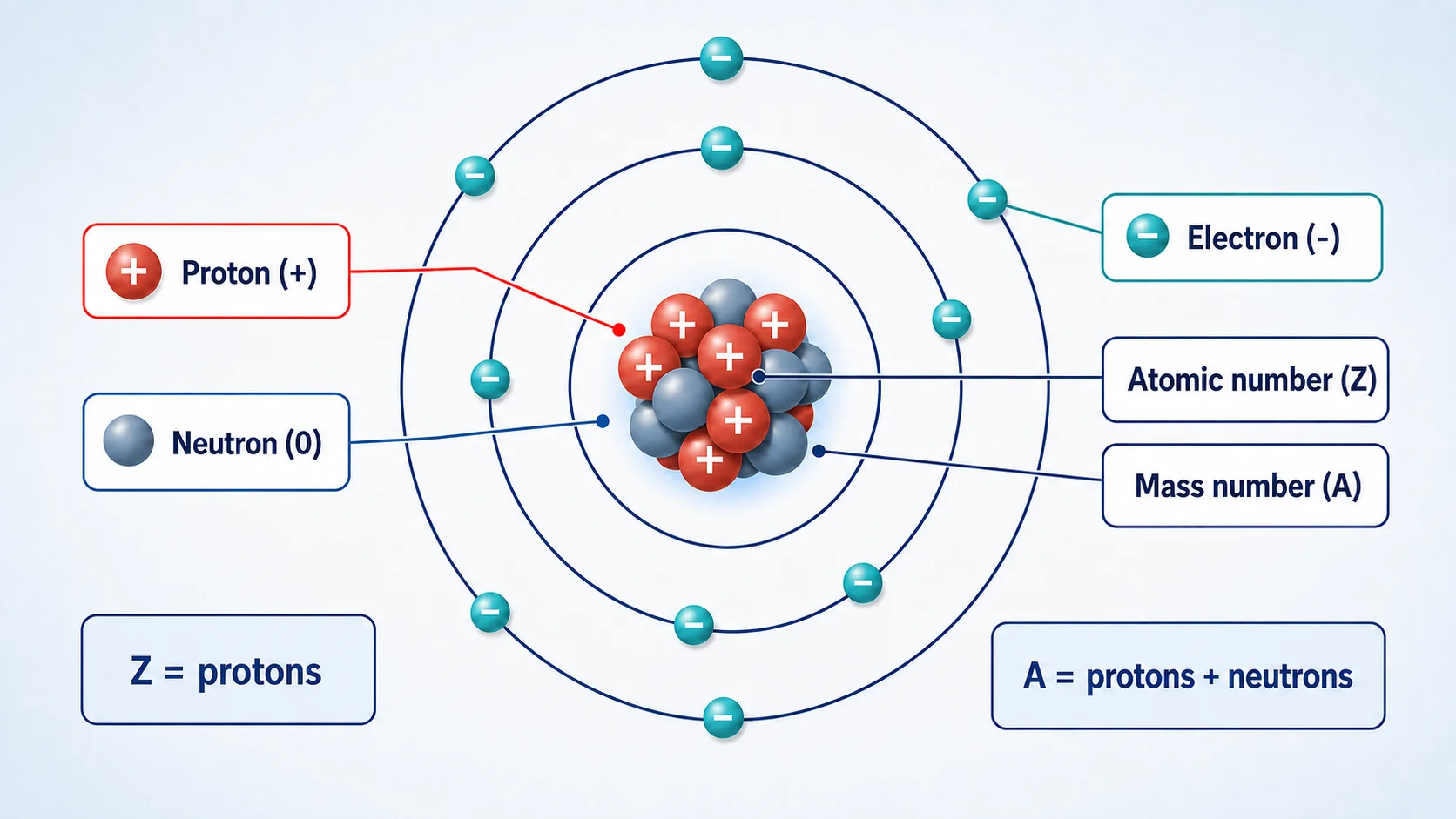
Atomic number (Z): The number of protons in the nucleus. Atomic number defines the element, so every atom of the same element has the same proton count.
Mass number (A): The total number of protons and neutrons in one isotope. It is normally a whole number.
Protons (p): Positively charged particles in the nucleus. The proton count is always equal to the atomic number.
Neutrons (n): Electrically neutral particles in the nucleus. Different neutron counts create different isotopes of the same element.
Electrons (e): Negatively charged particles outside the nucleus. A neutral atom has equal numbers of electrons and protons.
Ionic charge: The difference between the number of protons and electrons. Positive ions have lost electrons, while negative ions have gained electrons.
Atom Calculator Formulas
The calculator uses a small set of standard atomic-structure relationships:
Protons = Atomic number
Atomic number = Protons
Mass number = Protons + Neutrons
Neutrons = Mass number − Protons
Charge = Protons − Electrons
Electrons = Protons − Charge
When an atom is neutral, its charge is zero and its number of electrons equals its number of protons. Take care with negative charge values: subtracting a negative number increases the electron count.
How to Use the Atom Calculator
- Enter the atomic number, mass number, charge, or particle counts supplied by the problem.
- Use a whole-number mass number for a specific isotope.
- Enter neutral charge as 0, positive ions with a positive value, and negative ions with a negative value.
- Allow the calculator to connect the known values and determine the missing particle counts.
- Check that the calculated neutrons and electrons are nonnegative whole numbers.
- Select Reload to clear the fields and calculate another species.
Worked Example: Chlorine-35 Ion
Consider chlorine-35 with an ionic charge of 1−. Chlorine has atomic number 17, so it must contain 17 protons.
Protons = Atomic number = 17
The isotope has mass number 35. Subtracting the proton count gives the number of neutrons:
Neutrons = 35 − 17 = 18
Now calculate the electrons using the signed charge:
Electrons = 17 − (−1) = 18
The result is a chlorine-35 ion containing 17 protons, 18 neutrons, and 18 electrons. It has one more electron than proton, which explains its 1− charge.
Atom, Isotope and Ion Differences
An element is defined by its proton count. Changing the number of protons changes the element itself.
An isotope has the same proton count as other atoms of the element but a different neutron count. Carbon-12 and carbon-14 are both carbon because each has six protons, although their mass numbers differ.
An ion forms when the electron count differs from the proton count. Losing electrons creates a positive ion or cation; gaining electrons creates a negative ion or anion. Ion formation does not normally change the element’s identity because the proton count remains unchanged.
Mass Number Is Not Average Atomic Mass
This calculator requires the mass number of a particular isotope. Mass number is the whole-number total of protons and neutrons, such as 35 for chlorine-35.
The decimal value shown on a periodic table is usually the element’s average atomic mass. It reflects the weighted abundance of naturally occurring isotopes and should not normally be entered as the mass number. For example, chlorine’s average atomic mass is about 35.45, but chlorine-35 has a mass number of exactly 35 for particle-count calculations.
Common Input Mistakes
- Using a decimal periodic-table mass: enter the whole-number mass number of the isotope instead.
- Reversing the charge sign: positive ions have fewer electrons; negative ions have more.
- Adding charge to the proton count: basic ion formation changes electrons, not protons.
- Entering a mass number smaller than the atomic number: this would produce an impossible negative neutron count.
- Using the calculator for polyatomic ions: it is intended for single atoms and monatomic ions.
Assumptions and Limitations
The calculator handles basic relationships among atomic number, mass number, charge, protons, neutrons, and electrons. It assumes nonnegative whole-number particle counts and a whole-number isotope mass number.
It does not calculate electron configurations, orbital diagrams, isotope abundance, weighted average atomic mass, exact isotope mass, nuclear binding energy, radioactive decay, or the charge distribution of a molecule. Use appropriate laboratory data, a periodic table, or an advanced chemistry reference when those properties are required.
Atom Calculator FAQs
How do I find the number of protons?
The number of protons equals the atomic number. An element with atomic number 8 therefore has eight protons and is oxygen.
How do I calculate neutrons?
Subtract the atomic number or proton count from the isotope’s mass number. For chlorine-35, the calculation is 35 − 17 = 18 neutrons.
How many electrons are in a neutral atom?
A neutral atom has the same number of electrons and protons because their opposite charges balance.
How do I find electrons in a positive ion?
Subtract the positive charge from the proton count. A calcium ion with 20 protons and a 2+ charge has 20 − 2 = 18 electrons.
How do I find electrons in a negative ion?
Use electrons = protons − charge and retain the negative sign. A 1− chloride ion has 17 − (−1) = 18 electrons.
Does changing neutrons change the element?
No. Changing neutrons creates another isotope of the same element. Only a change in the number of protons changes the element’s identity.
Related Chemistry Calculators
- Avogadro’s Number Calculator — convert among moles, mass, and numbers of particles.
- Molarity Calculator — calculate moles, volume, or solution concentration.
- Half-Life Calculator — explore exponential decay and remaining quantity.
References
- OpenStax Chemistry 2e: Atomic Structure and Symbolism
- OpenStax Chemistry 2e: Chapter 2 Summary
- OpenStax Biology 2e: Atoms, Isotopes, Ions, and Molecules
Atom Calculator: Check Charge and Isotope Notation Separately
For a neutral atom, electrons equal protons; for an ion, electron count changes with charge. Neutrons depend on the selected isotope and equal mass number minus atomic number. Do not confuse an element’s average atomic mass from the periodic table with the whole-number mass number of one isotope. Write the isotope and ionic charge explicitly when reporting the result.