

Add Time Calculator
Enter up to 20 time values in various units. Results update in real time.
🧾 Quick summary
🧮 Step-by-step derivation
📚 Reference (conversion factors)
| Unit | To seconds | Notes |
|---|---|---|
| 1 millisecond | 0.001 | 1000 ms = 1 s |
| 1 second | 1 | — |
| 1 minute | 60 | 60 s = 1 min |
| 1 hour | 3600 | 60 min = 1 h |
| 1 day | 86,400 | 24 h = 1 d |
| 1 week | 604,800 | 7 d = 1 w |
| 1 month | 2,630,016 | Average = 30.44 d |
| 1 year | 31,557,600 | Average = 365.25 d |
Assumptions: months and years use time-averaged values for consistency across arbitrary ranges.
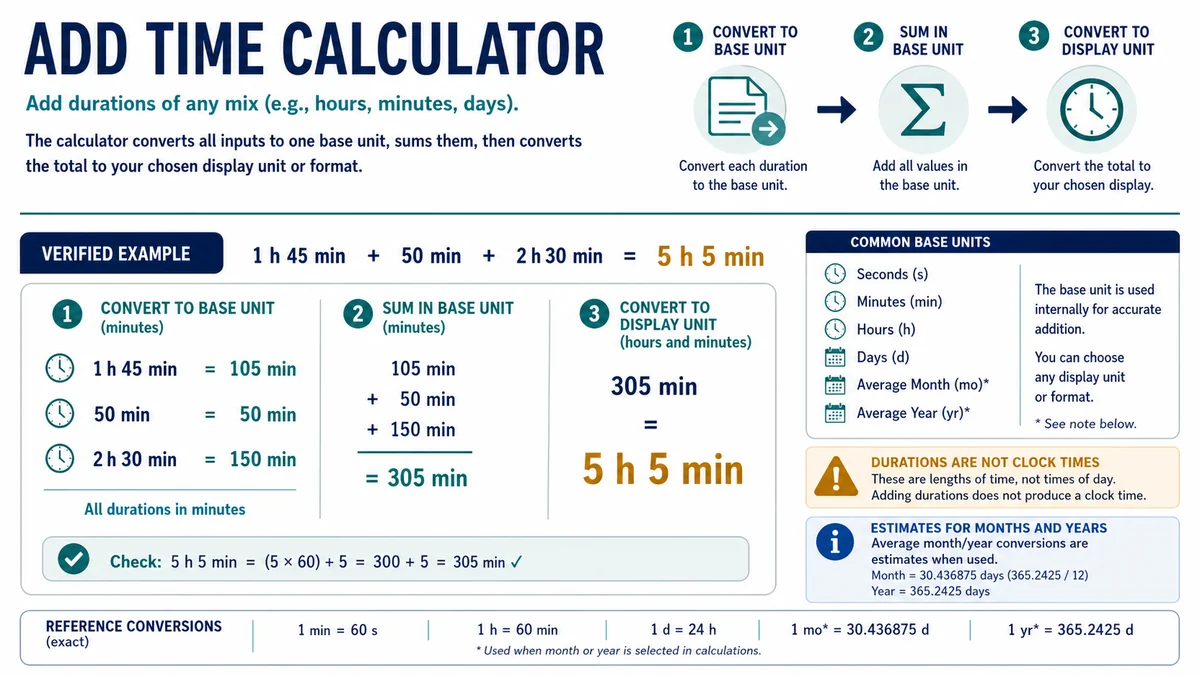
Adding several durations becomes confusing when some values are entered in hours, others in minutes, and others in larger or smaller units. The Add Time Calculator combines up to 20 time values, standardizes their units, and displays the total in your preferred format.
What the Add Time Calculator Calculates
The Add Time Calculator can combine durations entered in milliseconds, seconds, minutes, hours, days, weeks, average months, and average years. Each value can use a different unit.
The calculated total can then be displayed as:
- A single selected time unit
- Total seconds, minutes, hours, days, or weeks
- An approximate total in months or years
- A mixed duration format where supported
- A step-by-step derivation of the calculation
This tool adds elapsed durations. It does not calculate a future time of day, subtract dates, or determine the calendar date reached after a duration.
How to Use the Add Time Calculator
- Enter the first duration and select its unit.
- Add more duration fields as needed.
- Select the correct unit for every entered value.
- Choose how the final result should be displayed.
- Review the total and the step-by-step calculation.
- Use Refresh to clear the current entries and begin again.
Unused fields can remain empty. Always check the unit beside each value, especially when combining similar-looking values such as 1.5 hours and 1.5 minutes.
How the Add Time Calculator Works
The calculator first converts every entered duration into seconds. It then adds those second values and converts the total into the selected result unit.
Total seconds = sum of all entered durations converted to seconds
The standard conversion factors include:
- 1 millisecond = 0.001 seconds
- 1 minute = 60 seconds
- 1 hour = 3,600 seconds
- 1 day = 86,400 seconds
- 1 week = 604,800 seconds
For example, when hours and minutes are entered together, the hours are multiplied by 3,600 and the minutes by 60. The resulting seconds are added before the total is converted back into the chosen format.
How Months and Years Are Handled
Calendar months do not have a fixed length, and calendar years can contain either 365 or 366 days. To combine these units consistently with smaller durations, the Add Time Calculator uses time-averaged values:
- 1 average month = 30.44 days = 2,630,016 seconds
- 1 average year = 365.25 days = 31,557,600 seconds
These values are appropriate for approximate duration conversion but not for determining an exact calendar date. For example, adding one average month is not always the same as moving from the 15th of one month to the 15th of the next.
Worked Example: Add Hours and Minutes
Suppose you need to add 2 hours 30 minutes and 1 hour 45 minutes.
Convert the first duration to seconds:
(2 × 3,600) + (30 × 60) = 9,000 seconds
Convert the second duration:
(1 × 3,600) + (45 × 60) = 6,300 seconds
Add the converted values:
9,000 + 6,300 = 15,300 seconds
The Add Time Calculator converts 15,300 seconds back into 4 hours and 15 minutes.
Practical Uses for Adding Durations
This calculation can be helpful when combining:
- Work completed across several sessions
- Study or revision periods
- Exercise and training durations
- Video, audio, or podcast segments
- Travel stages and waiting times
- Machine, production, or project run times
- Reading sessions or other tracked activities
When using the total for payroll, billing, legal deadlines, or another official purpose, check whether a required rounding or reporting policy applies.
Duration Addition vs Clock-Time Addition
A duration describes an amount of elapsed time, such as 2 hours 30 minutes. A clock time identifies a point in a day, such as 2:30 PM.
This calculator adds durations. It does not determine the clock time produced by adding four hours to 2:30 PM. It also does not account for time zones, daylight-saving transitions, business days, holidays, or calendar rules.
For clock times, dates, subtraction, or elapsed time between two timestamps, use the Time Calculator.
Common Mistakes to Avoid
- Entering a clock time instead of a duration
- Selecting minutes when the entered value represents hours
- Reading 1.5 hours as 1 hour 5 minutes instead of 1 hour 30 minutes
- Treating an average month as an exact calendar month
- Assuming the result includes time-zone or daylight-saving changes
- Using the unrounded total when an official system requires a specific rounding rule
For a single-unit conversion, try the Minutes to Hours Converter. To estimate the time required to read a book, use the Reading Time Calculator.
Frequently Asked Questions
How do I add hours and minutes?
Convert each duration into a common unit, add the values, and convert the total back. This calculator performs those steps automatically.
What is 2 hours 30 minutes plus 1 hour 45 minutes?
The combined duration is 4 hours 15 minutes.
Can I add durations that use different units?
Yes. You can combine values such as hours, minutes, seconds, days, and weeks because the calculator converts them into seconds before adding them.
Does the calculator use exact calendar months?
No. It uses an average month of 30.44 days and an average year of 365.25 days. Use a calendar-aware tool when exact dates matter.
Can the Add Time Calculator add time to a clock?
No. The Add Time Calculator totals elapsed durations. Use the Time Calculator for calculations involving clock times, dates, or timestamps.
Sources
Normalize Minutes and Hours After Adding
When added minutes reach 60, carry them into the hour total; the same principle applies to seconds. Clock-time addition may also cross midnight, so retain the date when the result affects schedules. For durations, avoid AM/PM entirely and report total hours when values can exceed 24. Treat daylight-saving and time-zone changes as separate calendar issues.