Sales Tax Calculator
- Rate as decimal: r = p / 100
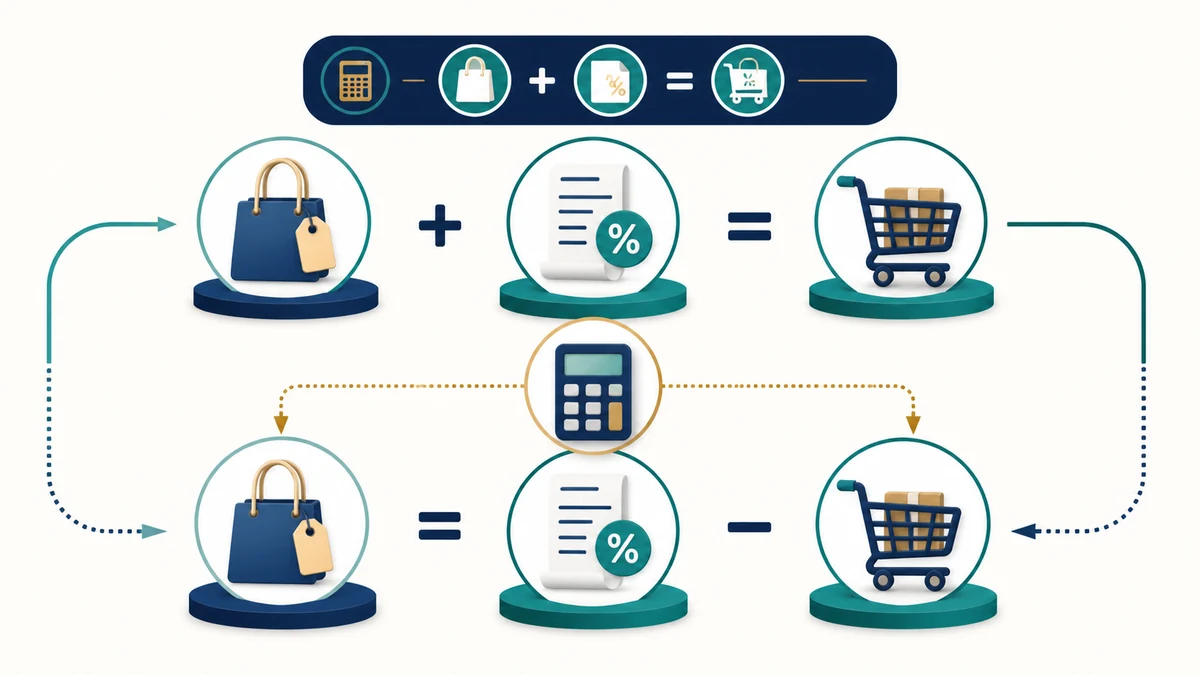
- Forward (tax-exclusive): T = N × r ; G = N + T = N × (1 + r)
- Reverse (tax-inclusive): N = G / (1 + r) ; T = G − N = G × r / (1 + r)
- Find rate: p = 100 × (G − N) / N ; also p = 100 × T / N ; or p = 100 × T / (G − T)
Use this Sales Tax Calculator to add sales tax to a net price, remove sales tax from a gross price, find the tax amount, or calculate the implied sales tax rate. Enter any two known values, such as tax rate and net price, then calculate the missing sales tax values.
Important Note: This Sales Tax Calculator performs math only. It can add sales tax to a net price, remove sales tax from a tax-included gross price, find the tax amount, or calculate the implied sales tax rate from known values.
It does not verify whether a product or service is taxable, whether local tax applies, whether an exemption applies, whether a tax holiday is active, whether multiple jurisdictions apply, or whether a state, city, district, VAT, GST, or sales-tax rate is current.
Use the official rate from the seller, receipt, tax authority, invoice system, point-of-sale system, accounting platform, or qualified tax professional before relying on the result for official invoices, bookkeeping, filings, or business compliance.
Reviewed by: AjaxCalculators Editorial Team
Last updated: April 29, 2026
Method source: Standard sales tax formulas using tax rate as a decimal, net price before tax, gross price after tax, and tax amount
Editorial standards: AjaxCalculators Editorial Policy
What This Sales Tax Calculator Calculates
This calculator helps solve common sales tax problems when you know any two of the main values: sales tax rate, net price, gross price, or tax amount.
The calculator can calculate:
- Net price before tax
- Gross price after tax
- Sales tax amount
- Sales tax rate
- Reverse sales tax from a tax-included price
- Step-by-step derivation
The live tool includes a currency selector for labels only. Changing the currency updates the displayed currency label, but it does not convert money between currencies.
What Sales Tax Means
Sales tax is a tax added to the sale price of taxable goods or services. It is usually calculated as a percentage of the pre-tax price.
For example, if an item costs $100 before tax and the sales tax rate is 8%, the tax amount is:
$100 × 8% = $8
The final after-tax price is:
$100 + $8 = $108
In this calculator, the pre-tax price is called the net price, and the after-tax price is called the gross price.
How the Sales Tax Calculator Works
1) Convert the Sales Tax Percentage to a Decimal
The calculator first converts the sales tax percentage into a decimal rate.
r = p ÷ 100
In this formula:
- p is the sales tax percentage
- r is the tax rate as a decimal
For example:
8% ÷ 100 = 0.08
2) Add Sales Tax to a Net Price
If you know the net price and tax rate, the calculator can find the tax amount and gross price.
Tax amount = net price × tax rate
Gross price = net price + tax amount
Or directly:
Gross price = net price × (1 + tax rate)
3) Remove Sales Tax from a Gross Price
If you know the gross price and tax rate, the calculator can remove the tax to find the pre-tax net price.
Net price = gross price ÷ (1 + tax rate)
Then:
Tax amount = gross price − net price
4) Find Sales Tax Rate from Net and Gross Price
If you know the net price and gross price, the calculator can calculate the implied sales tax rate.
Sales tax rate = ((gross price − net price) ÷ net price) × 100
This is useful when you know the before-tax and after-tax prices and want to find the percentage rate.
5) Find Sales Tax Rate from Tax Amount and Net Price
If you know the tax amount and net price, the rate can be calculated as:
Sales tax rate = (tax amount ÷ net price) × 100
6) Find Sales Tax Rate from Tax Amount and Gross Price
If you know the tax amount and gross price, first remove the tax amount from the gross price to get the net price.
Net price = gross price − tax amount
Then:
Sales tax rate = (tax amount ÷ net price) × 100
Sales Tax Formula Summary
| What You Want to Find | Formula | Meaning |
|---|---|---|
| Rate as decimal | r = p ÷ 100 | Converts the sales tax percentage into decimal form |
| Tax amount from net price | T = N × r | Finds the tax added to the pre-tax price |
| Gross price from net price | G = N + T | Adds tax amount to the net price |
| Gross price directly | G = N × (1 + r) | Calculates the final tax-included price in one step |
| Net price from gross price | N = G ÷ (1 + r) | Removes tax from a tax-included price |
| Tax amount from gross and net | T = G − N | Finds the tax amount when both prices are known |
| Tax rate from net and gross | p = 100 × (G − N) ÷ N | Finds the implied tax percentage |
| Tax rate from tax amount and net | p = 100 × T ÷ N | Finds the tax percentage from known tax and pre-tax price |
What Net Price, Gross Price, and Tax Amount Mean
| Term | Meaning | Example |
|---|---|---|
| Net price | Price before sales tax is added. | $100 before tax |
| Tax amount | Sales tax charged on the taxable net price. | $8 tax |
| Gross price | Final price after sales tax is included. | $108 after tax |
| Sales tax rate | The tax percentage applied to the taxable net price. | 8% |
Worked Example: Add Sales Tax
Suppose an item has:
- Net price: $250
- Sales tax rate: 8%
Step 1: Convert the rate to a decimal
r = 8 ÷ 100
r = 0.08
Step 2: Calculate tax amount
Tax amount = net price × rate
Tax amount = 250 × 0.08
Tax amount = $20
Step 3: Calculate gross price
Gross price = net price + tax amount
Gross price = 250 + 20
Gross price = $270
So, an item that costs $250 before tax with 8% sales tax has a tax amount of $20 and a final gross price of $270.
Worked Example: Reverse Sales Tax
Suppose the final tax-included price is $108, and the sales tax rate is 8%.
Step 1: Convert the rate to a decimal
r = 8 ÷ 100
r = 0.08
Step 2: Use the reverse sales tax formula
Net price = gross price ÷ (1 + r)
Step 3: Substitute the values
Net price = 108 ÷ 1.08
Step 4: Calculate net price
Net price = $100
Step 5: Calculate tax amount
Tax amount = gross price − net price
Tax amount = 108 − 100
Tax amount = $8
So, a gross price of $108 at 8% sales tax means the pre-tax price is $100 and the tax amount is $8.
Worked Example: Find the Sales Tax Rate
Suppose you know:
- Net price: $80
- Gross price: $86
Step 1: Find the tax amount
Tax amount = gross price − net price
Tax amount = 86 − 80
Tax amount = $6
Step 2: Divide tax amount by net price
Rate decimal = 6 ÷ 80
Rate decimal = 0.075
Step 3: Convert to percent
Sales tax rate = 0.075 × 100
Sales tax rate = 7.5%
So, if an $80 pre-tax item becomes $86 after tax, the implied sales tax rate is 7.5%.
Worked Example: Find Net Price from Tax Amount
Suppose the tax amount is $12, and the sales tax rate is 6%.
Step 1: Convert the rate to a decimal
r = 6 ÷ 100
r = 0.06
Step 2: Rearrange the tax formula
Tax amount = net price × rate
So:
Net price = tax amount ÷ rate
Step 3: Calculate
Net price = 12 ÷ 0.06
Net price = $200
Step 4: Find gross price
Gross price = net price + tax amount
Gross price = 200 + 12
Gross price = $212
So, a tax amount of $12 at a 6% rate corresponds to a net price of $200 and a gross price of $212.
How to Use This Sales Tax Calculator
- Enter any two known fields: sales tax rate, net price, gross price, or tax amount.
- Select the currency label you want to display.
- Use the sales tax field for the percentage rate, such as 8.25 for 8.25%.
- Use net price for the price before tax.
- Use gross price for the price after tax.
- Use tax amount for the sales tax charged.
- Review the calculated missing fields.
- Use the step-by-step derivation to check the formula used.
- Click Reset calculator to clear the tool and start again.
How to Interpret the Result
| Result | What It Means | Important Caution |
|---|---|---|
| Sales tax rate | The tax percentage applied to the taxable net price. | Enter 8.25 for 8.25%, not 0.0825. |
| Net price before tax | The price before sales tax is added. | This may not be the taxable amount if discounts, exemptions, fees, or special rules apply. |
| Gross price after tax | The final tax-included price. | May differ from an official invoice because of rounding, local rules, or item taxability. |
| Tax amount | The money amount added as sales tax. | Does not confirm whether the tax was legally required or correctly collected. |
| Currency label | The symbol or currency label shown beside the result. | Changing currency updates labels only; it does not convert exchange rates. |
| Step-by-step derivation | The formula path used by the calculator. | Use it to check whether the calculator solved forward tax, reverse tax, or rate calculation. |
Forward Sales Tax vs Reverse Sales Tax
Forward sales tax and reverse sales tax solve opposite problems. Use forward sales tax when you are adding tax to a pre-tax item. Use reverse sales tax when you already have a tax-included total and want to know the original price before tax.
| Calculation Type | Known Values | Goal | Common Formula |
|---|---|---|---|
| Forward sales tax | Net price and tax rate | Find tax amount and gross price | G = N × (1 + r) |
| Reverse sales tax | Gross price and tax rate | Find net price and tax amount | N = G ÷ (1 + r) |
| Rate calculation | Net price and tax amount, or net price and gross price | Find the implied sales tax rate | p = 100 × T ÷ N |
Sales Tax Rate as a Percent vs Decimal
Sales tax rates are usually written as percentages, but formulas use decimal form. To convert a percentage into a decimal, divide by 100. To convert a decimal into a percentage, multiply by 100.
| Percent Rate | Decimal Rate | Multiplier for Gross Price |
|---|---|---|
| 5% | 0.05 | 1.05 |
| 6% | 0.06 | 1.06 |
| 7.5% | 0.075 | 1.075 |
| 8% | 0.08 | 1.08 |
| 8.25% | 0.0825 | 1.0825 |
| 10% | 0.10 | 1.10 |
Common Sales Tax Calculations
| Net Price | Sales Tax Rate | Tax Amount | Gross Price |
|---|---|---|---|
| $50 | 5% | $2.50 | $52.50 |
| $100 | 6% | $6.00 | $106.00 |
| $100 | 8% | $8.00 | $108.00 |
| $250 | 8.25% | $20.63 | $270.63 |
| $500 | 10% | $50.00 | $550.00 |
Why Sales Tax Rates Vary
Sales tax rates can vary by country, state, province, city, county, product category, and transaction type. Some places have state-level rates, some have local rates, and some combine several tax jurisdictions into one total rate.
| Reason Rates Can Vary | Example | Why It Matters |
|---|---|---|
| Location | State, province, city, county, or district | The same product can have different rates in different places. |
| Product or service category | Groceries, clothing, digital goods, prepared food, vehicles, or services | Some items may be taxable, exempt, or taxed at a reduced rate. |
| Exemption status | Tax-exempt customer, resale purchase, nonprofit purchase, or business exemption | The taxable amount may change or tax may not apply. |
| Tax holidays | Temporary exemptions for school supplies, clothing, disaster supplies, or energy-efficient items | The normal rate may not apply during a limited period. |
| Multiple jurisdictions | State rate plus city, county, district, or special local tax | The correct total rate may be a combined rate. |
| Business rules | Marketplace facilitator rules, remote seller thresholds, or invoice rounding | Business tax compliance may require more than simple math. |
Because of this, a sales tax calculator should be used as a math tool. It does not replace an official tax-rate lookup, receipt, invoice, accounting system, or tax authority guidance.
Currency Label vs Currency Conversion
The calculator includes a currency selector so the displayed labels match the currency you are using. This is helpful for formatting, but it does not convert money between currencies.
| Action | What Changes | What Does Not Change |
|---|---|---|
| Change currency from USD to BDT | The displayed currency label changes. | The numeric amount is not converted using an exchange rate. |
| Change currency from GBP to EUR | The symbol or label changes. | The calculator does not apply foreign exchange rates or conversion fees. |
| Use a current exchange rate | Requires a separate currency conversion step. | This sales tax tool does not fetch live exchange rates. |
For example, changing the label from USD to BDT changes the label only. It does not convert US dollars to Bangladeshi taka using an exchange rate.
Common Mistakes to Avoid
| Mistake | Why It Causes Problems |
|---|---|
| Entering 0.08 when the field expects 8 for 8% | The calculator may treat the value as 0.08%, producing a much smaller tax amount. |
| Confusing net price with gross price | Forward and reverse sales tax formulas use different starting values. |
| Applying sales tax twice to a tax-included price | This can overstate the final price. |
| Assuming currency label changes convert money | The currency selector changes labels only and does not use exchange rates. |
| Using a rate from the wrong location | Sales tax can vary by city, county, state, province, district, or country. |
| Assuming every item is taxable at the same rate | Taxability can vary by product or service category. |
| Ignoring exemptions or tax holidays | The correct tax amount may be reduced or zero in some situations. |
| Using rounded intermediate values for official invoices | Invoice systems may follow specific rounding rules. |
Practical Uses
This Sales Tax Calculator can be useful for:
- adding sales tax to a pre-tax price
- removing tax from a tax-included price
- checking a receipt or invoice
- estimating shopping totals
- calculating tax amount from net price
- finding the implied sales tax rate
- comparing before-tax and after-tax prices
- preparing quick business, retail, or accounting estimates
- checking gross price after entering a tax percentage
Important Assumptions and Limitations
| Assumption or Limitation | What It Means |
|---|---|
| Math only | The calculator performs sales tax arithmetic, not tax-law verification. |
| No live tax-rate lookup | It does not check current official tax rates by address or jurisdiction. |
| No taxability decision | It does not decide whether a specific product or service is taxable. |
| No exemption handling | It does not verify exemptions, resale certificates, nonprofit status, or customer-specific tax treatment. |
| No tax holiday logic | It does not check whether a temporary tax holiday or reduced-rate period applies. |
| Combined-rate assumption | For multiple jurisdictions, you must enter the combined rate yourself. |
| No currency conversion | The currency selector changes labels only and does not apply exchange rates. |
| No invoice-compliance check | It does not verify official invoice formatting, line-item rounding, or tax reporting rules. |
| No filing or business compliance support | It does not replace accounting, invoicing, point-of-sale, or tax-compliance software. |
| Professional verification needed | For official tax filing or business compliance, verify rates and rules with the relevant tax authority or a qualified tax professional. |
When You May Need More Than This Calculator
This calculator is best for simple sales tax math. You may need a different tool, official source, accounting system, point-of-sale platform, or tax professional if you need:
| Need | Why This Calculator Is Not Enough |
|---|---|
| Current tax rates by address | Rates can vary by jurisdiction and may change over time. |
| Taxability by product category | Some goods and services may be exempt, reduced-rate, or specially taxed. |
| Business sales tax filing | Filing requires official records, collection rules, return schedules, and jurisdiction requirements. |
| VAT or GST calculations | VAT/GST systems may use different rules from retail sales tax. |
| Multi-jurisdiction tax compliance | State, local, district, and cross-border rules may apply together. |
| Marketplace facilitator rules | Online marketplace obligations may differ from direct seller obligations. |
| Tax-exempt customer handling | Exemption certificates and customer status need separate verification. |
| Invoice-level tax rounding rules | Official systems may round tax by line item, invoice total, or jurisdiction rule. |
| Currency exchange conversion | Requires current exchange rates and may include conversion fees. |
References
- Streamlined Sales Tax Governing Board — State Sales Tax Information and Rate Lookup Links
- Federation of Tax Administrators — Research and Tax Rates
- Tax Foundation — State and Local Sales Tax Rates
- OECD — Consumption Tax Trends 2024
- NIST — Approximate Conversions from U.S. Customary Measures to Metric
Related Calculators
- VAT Calculator
- Percent Off Calculator
- Percentage Calculator
- Margin Calculator
- Markup Calculator
- Weight Price Comparison Calculator
- Loan Calculator
- Car Finance Calculator
Sales Tax Calculator Disclaimer
This Sales Tax Calculator provides general sales-tax math only. It can add tax to a net price, remove tax from a gross price, calculate tax amount, and estimate an implied tax rate from known values.
It does not verify official rates, product or service taxability, exemptions, reduced rates, local rules, tax holidays, invoice requirements, filing obligations, business registration rules, marketplace facilitator rules, VAT/GST rules, currency exchange, or business compliance obligations.
Sales tax rules vary by location, item type, seller, buyer, transaction type, exemption status, and date. Confirm the correct rate, taxable amount, exemption status, invoice treatment, and reporting method with the seller, receipt, tax authority, accounting system, point-of-sale platform, or qualified tax professional before using the result for official invoices, bookkeeping, filings, or compliance records.