

Marks Percentage Calculator
Calculate your percentage from obtained marks and total marks, with an optional target or passing percentage check.
Results
This calculator uses the basic marks percentage formula: obtained marks divided by total marks, multiplied by 100. Official grading may differ if your school uses curves, practical marks, bonus marks, negative marking, or subject-wise minimum requirements.
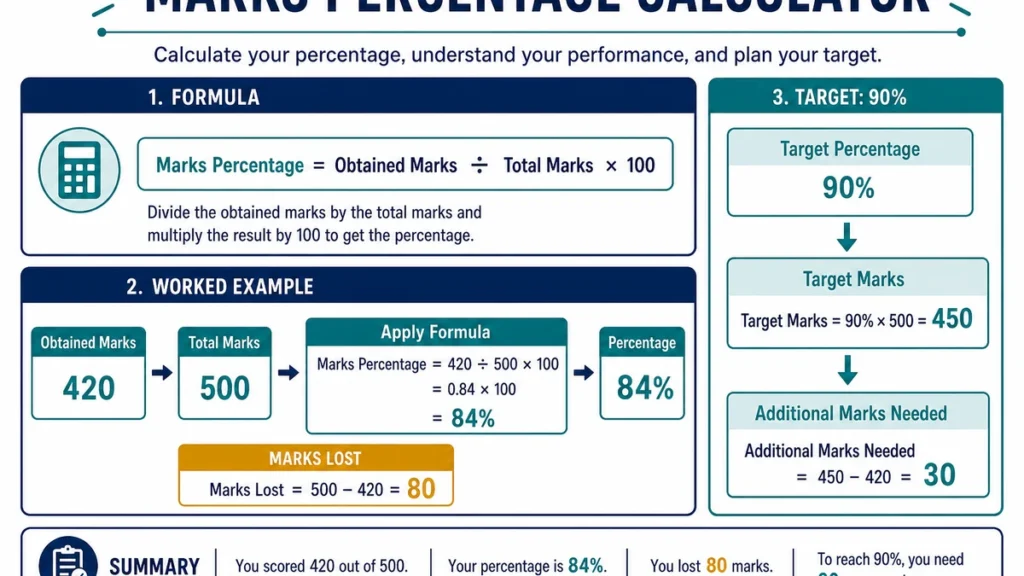
A score such as 62 marks does not tell you very much by itself. The meaning becomes clear only when you know the total marks available.
The Marks Percentage Calculator turns obtained marks into a percentage, shows how many marks were not earned, and can also work backwards from a target percentage to show the marks required.
For most calculations, you only need two numbers:
Marks obtained
and
Total marks available
Calculate Your Percentage From Marks
The basic formula is:
Percentage = Marks obtained ÷ Total marks × 100
Suppose an exam is worth 80 marks and you score 62.
The calculation is:
62 ÷ 80 × 100 = 77.5%
So your result is:
77.5%
The number of marks not earned is:
80 − 62 = 18
This means the same result can be described as:
62 out of 80
77.5%
18 marks below the maximum
Each tells you something slightly different about the assessment.
How to Use the Marks Percentage Calculator
- Enter the marks you obtained.
- Enter the maximum marks available.
- Click Calculate.
- Review the percentage and marks not earned.
- If you have a target percentage, enter it to find the marks needed.
- Use the official assessment maximum if it was changed after moderation or a question was removed.
Make sure the obtained and total marks belong to the same test, assignment, paper, or group of assessments.
Entering 62 marks from one exam with an 80-mark maximum from another will produce a valid-looking percentage that has no useful meaning.
Finding the Marks Needed for a Target Percentage
You can reverse the calculation when you already know the percentage you want.
Use:
Target marks = Target percentage ÷ 100 × Total marks
Suppose an upcoming examination is worth 120 marks and you want at least 85%.
Calculate:
85 ÷ 100 × 120 = 102
So you need:
102 out of 120
to achieve exactly 85%.
What If the Required Marks Are a Decimal?
Not every target produces a whole-number result.
Suppose an exam is worth 75 marks and your target is 80%.
80 ÷ 100 × 75 = 60
That gives a clean whole number.
But a target of 83% gives:
83 ÷ 100 × 75 = 62.25
If the exam awards only whole marks, 62 marks would not quite reach 83%.
Check:
62 ÷ 75 × 100 = 82.67%
With 63 marks:
63 ÷ 75 × 100 = 84%
So you would need at least:
63 marks
when only whole marks can be awarded.
If half marks or decimal scores are possible, use the actual scoring increments allowed by the assessment.
Combining Marks From Several Assessments
When several tests have different maximum marks, add the obtained marks together and add the maximum marks together before calculating the percentage.
For example:
| Assessment | Marks Obtained | Total Marks |
|---|---|---|
| Test 1 | 42 | 50 |
| Test 2 | 68 | 80 |
| Test 3 | 27 | 30 |
| Combined | 137 | 160 |
Now calculate:
137 ÷ 160 × 100 = 85.625%
So the combined percentage is:
85.625%
If you want two decimal places:
85.63%
This is usually better than averaging the three separate percentages because the assessments do not all carry the same number of marks.
Why Averaging Individual Percentages Can Be Wrong
Using the previous example:
42 / 50 = 84%
68 / 80 = 85%
27 / 30 = 90%
A simple average gives:
(84 + 85 + 90) ÷ 3 = 86.33%
But the correct marks-based combined percentage is:
85.625%
The difference happens because the 80-mark paper should have more influence than the 30-mark paper.
Adding raw marks and totals preserves that weighting automatically.
When Is Averaging Percentages Fine?
A simple average works when every assessment has the same maximum marks or has been explicitly assigned equal weight.
For example, suppose three tests are each worth 100 marks:
80/100
90/100
70/100
The combined percentage is:
240 ÷ 300 × 100 = 80%
The simple average is also:
(80 + 90 + 70) ÷ 3 = 80%
Because all three tests carry equal weight, both methods agree.
Percentage Is Not the Same as a Grade
The calculator gives you a percentage.
It does not automatically decide whether that percentage is:
- a pass;
- an A, B, C, or another letter grade;
- a distinction;
- a first-class result;
- a CGPA;
- a percentile rank; or
- another academic classification.
Those interpretations depend on the rules used by the school, university, examination board, employer, or qualification system.
For example, 70% could represent very different grades under different systems.
Use the official grading scale to interpret the percentage after you calculate it.
Percentage and Percentile Are Different
These two terms sound similar but mean different things.
A percentage tells you how many marks you earned relative to the available marks.
For example:
80 out of 100 = 80%
A percentile compares your performance with other candidates.
Being in the 80th percentile does not mean you scored 80%.
It generally means your performance was higher than that of about 80% of the comparison group, depending on how the percentile is defined.
The Marks Percentage Calculator calculates percentages, not percentile ranks.
Partial Marks Work the Same Way
You do not need whole numbers.
Suppose you earned:
37.5 marks out of 50
The calculation is:
37.5 ÷ 50 × 100 = 75%
The formula works the same way with decimal, half-point, or other partial-credit scoring.
Enter the values exactly as they appear in the official record whenever possible.
What If a Question Is Removed?
Sometimes an examination originally worth 100 marks is officially reduced because a question is removed.
Suppose your score is:
72 marks
and the revised official maximum becomes:
90 marks
Use:
72 ÷ 90 × 100 = 80%
Do not continue using the original 100-mark maximum if the official scoring maximum has changed.
The percentage should be based on the marks that actually count.
Bonus Marks and Scores Above the Maximum
Some courses allow bonus or extra-credit marks.
That can produce unusual results depending on the policy.
For example, a student might have:
102 points from an assessment originally worth 100
One institution may allow this to appear as 102%.
Another may cap the recorded percentage at 100%.
A third may apply the bonus elsewhere in the course grade.
The calculator can perform the arithmetic, but it cannot decide how bonus marks should be recorded. Follow the assessment rules before entering a score above the stated maximum.
Check Which Question You Are Asking
Three calculations are often confused.
“24 is what percentage of 80?”
Use:
24 ÷ 80 × 100 = 30%
“What is 30% of 80?”
Use:
30 ÷ 100 × 80 = 24
“How many more marks do I need to reach 30% of 80?”
First find the target marks:
24
Then subtract the marks you already have.
These are related questions, but they require different operations.
Marks Lost
The calculator can also show the difference between your obtained marks and the maximum available.
Use:
Marks lost = Total marks − Marks obtained
For example:
73 out of 100
means:
100 − 73 = 27 marks lost
This can be useful when reviewing how much room there was between your result and a perfect score.
It does not tell you where those marks were lost; for that you would need the actual assessment breakdown.
Common Marks Percentage Mistakes to avoid
Using the Wrong Maximum Marks
The obtained marks and total marks must belong to the same assessment.
Always check the official maximum before calculating.
Averaging Unequal Assessments
A 20-mark quiz and a 100-mark exam should not normally have equal influence unless the course explicitly says they do.
Add the marks and maximums instead.
Mixing Raw Marks With Weighted Course Scores
A score such as:
18/20
is a raw assessment result.
A weighted contribution such as:
9% toward the final course grade
is something different.
Use the Weighted Grade Calculator when assignments or categories have separate course weights.
Rounding Every Assessment Before Combining Them
Keep the original marks whenever possible.
Add the precise values first, then calculate and round the final percentage.
Treating the Percentage as the Official Grade
A percentage is only one part of the academic result.
The institution decides how percentages map to grades, passes, classifications, or GPA values.
How to Check the Calculation Manually
A quick way to verify the calculator is to multiply the result back.
Suppose:
45 out of 60 = 75%
Now calculate:
75 ÷ 100 × 60 = 45
You return to the original marks.
For a target calculation, use the same reverse check.
If you need 72 marks on a 90-mark assessment:
72 ÷ 90 × 100 = 80%
So 72 marks correctly corresponds to an 80% target.
Planning for a Pass Mark
Suppose an exam is worth 150 marks and the official pass requirement is 40%.
Required marks:
40 ÷ 100 × 150 = 60
So the mathematical pass threshold is:
60 marks
If your institution applies separate rules—such as minimum marks in individual sections, practical components, or coursework—the overall percentage alone may not guarantee a pass.
Always use the published assessment rules when eligibility depends on more than the total score.
Keep Multi-Assessment Records Together
When calculating a combined result, keep a simple record of:
- assessment name;
- marks earned;
- maximum marks;
- date or reporting period; and
- any revised maximum or bonus rule.
This makes it easier to identify a mistake later.
It also prevents marks from different semesters, courses, or assessment periods from being mixed accidentally.
Useful Follow-Up Calculations
If your course uses assignment or category weights rather than raw marks, use the Weighted Grade Calculator.
Use the Final Grade Calculator when you want to know what exam score is needed to reach a target course grade.
If an instructor has announced a specific grading adjustment, the Grade Curve Calculator can help you examine that rule.
FAQ
How do I calculate percentage from marks?
Divide the marks obtained by the total marks and multiply by 100.
For example:
72 ÷ 90 × 100 = 80%
How do I find the marks needed for a target percentage?
Multiply the total marks by the target percentage expressed as a decimal.
For example:
80% of 150 = 0.80 × 150 = 120 marks
Can obtained marks be higher than total marks?
Normally, no.
It may happen in systems with extra credit or bonus marks, but the institution determines whether the final recorded percentage can exceed 100%.
Should 79.5% be rounded to 80%?
Only if the relevant grading or reporting rule says to round that way.
Keep the unrounded value for your own calculation whenever possible.
How do I combine marks from several exams?
Add all obtained marks together and add all available marks together.
Then calculate:
Combined percentage = Total obtained marks ÷ Total available marks × 100
Should I average the percentages from several tests?
Only if the tests have equal weight.
If their maximum marks differ, combining the raw totals is usually more appropriate.
Is percentage the same as percentile?
No.
Percentage measures marks earned relative to marks available. Percentile compares your result with the performance of other people.
Does this calculator tell me whether I passed?
It can compare your score with a target percentage, but it does not know your institution’s official pass rules unless you enter them.
Some courses also require minimum scores in individual components.
Can I use decimal marks?
Yes.
Enter decimal or partial-credit marks exactly as awarded.
Is the calculator result official?
No.
It provides the arithmetic result based on the values entered. Your official mark sheet, exam board, school, or university determines the recorded grade.
Use the Original Marks Whenever Possible
The Marks Percentage Calculator is most reliable when you begin with the actual marks earned and the official maximum.
Keep those values unchanged through the calculation, especially when several assessments are being combined.
A percentage makes a raw mark easier to understand, but the number should still be interpreted in the context of the assessment. The same 80% can mean very different things under different grading systems.
Use the calculator for the arithmetic, then use the official academic rules to understand what the result means.