

CGPA Calculator
Calculate cumulative CGPA from semester GPAs and credit hours using a 4.0, 5.0, or 10.0 grading scale.
Semesters / Terms
Enter each semester GPA and its credit hours. Blank rows are ignored.
CGPA Results
This calculator uses the standard credit-weighted CGPA formula. Official academic records may differ if your institution uses repeated-course replacement, excluded credits, pass/fail courses, transfer-credit rules, or a different CGPA policy.
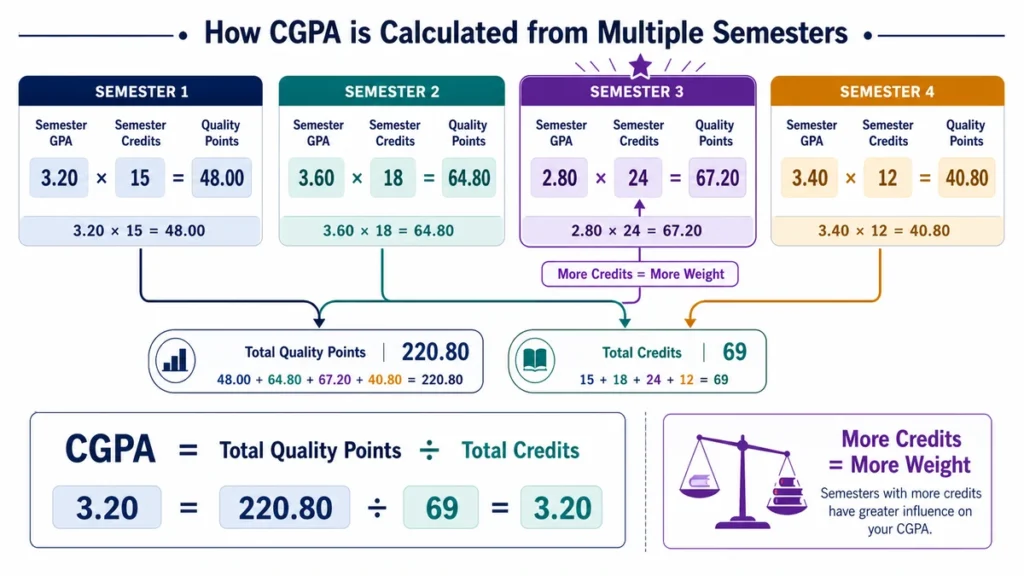
A CGPA Calculator helps you combine semester GPAs into one cumulative result without treating every semester as if it carried the same number of credits.
Instead of simply averaging your semester GPA values, the calculator weights each term by the credits completed during that semester. This means a 24-credit semester has more influence on your CGPA than a 12-credit semester.
The basic idea is simple:
Multiply each semester GPA by its GPA credits, add the quality points, then divide by the total GPA credits.
How to Use the CGPA Calculator
- Enter the GPA for each semester or term.
- Enter the number of GPA credits completed in that same term.
- Make sure all semesters use the same grading scale.
- Add every semester that should be included in your cumulative GPA.
- Click Calculate.
- Review the total credits, total quality points, and calculated CGPA.
- Add a future semester as a projected row if you want to explore a possible outcome.
Use the credit total that actually counts toward GPA at your institution. Credits earned toward a degree are not always the same as credits included in the GPA calculation.
CGPA Calculator Formula
For each semester:
Semester quality points = Semester GPA × Semester GPA credits
Then add the quality points from all included semesters:
Total quality points = Sum of semester quality points
Add the corresponding credits:
Total GPA credits = Sum of semester GPA credits
Finally:
CGPA = Total quality points ÷ Total GPA credits
This approach gives each semester influence in proportion to its credit load.
Worked CGPA Example
Suppose your academic record contains these three semesters:
| Semester | Semester GPA | GPA Credits | Quality Points |
|---|---|---|---|
| Term 1 | 3.20 | 12 | 38.4 |
| Term 2 | 3.60 | 18 | 64.8 |
| Term 3 | 3.40 | 15 | 51.0 |
| Total | — | 45 | 154.2 |
Now divide the total quality points by the total credits:
154.2 ÷ 45 = 3.4267…
Rounded to two decimal places:
CGPA = 3.43
Why You Should Not Simply Average Semester GPAs
If you took the three semester GPAs above and calculated a simple average:
(3.20 + 3.60 + 3.40) ÷ 3 = 3.40
That gives a different result from the credit-weighted CGPA of 3.43.
The reason is that the semesters did not have the same credit load.
Term 2 had 18 credits, so its 3.60 GPA should influence the cumulative result more than Term 1’s 3.20 GPA across only 12 credits.
A simple average is only appropriate when every included semester carries exactly the same number of GPA credits.
What Are Quality Points?
Quality points combine a GPA value with the credits behind it.
For example, a semester GPA of:
3.50
across:
16 credits
produces:
3.50 × 16 = 56 quality points
A second semester with the same 3.50 GPA across 8 credits produces:
3.50 × 8 = 28 quality points
The GPA is identical, but the 16-credit semester contributes twice as much to the cumulative record.
Planning Your Next Semester
You can also use the calculator to see how a future semester might affect your CGPA.
Using the earlier example, the current record is:
45 credits
154.2 quality points
CGPA = 3.43
Suppose you expect to complete another 15 credits with a semester GPA of 3.80.
The projected semester quality points would be:
3.80 × 15 = 57
Add them to the current record:
154.2 + 57 = 211.2 quality points
The new credit total would be:
45 + 15 = 60 credits
Projected CGPA:
211.2 ÷ 60 = 3.52
So the projected cumulative GPA would be:
3.52
| Record | GPA Credits | Quality Points | CGPA |
|---|---|---|---|
| Current record | 45 | 154.2 | 3.43 |
| Planned semester | 15 | 57.0 | 3.80 semester GPA |
| Projected total | 60 | 211.2 | 3.52 |
This is only a planning estimate. Once the semester is complete, replace the projected GPA with the official result.
Use One GPA Scale Throughout
All semester GPA values included in the same calculation should use the same grading scale.
For example, you should not directly combine:
3.4 out of 4.0
with:
8.1 out of 10.0
Those values belong to different scales.
If part of your academic history uses another grading system, check how your institution officially converts or handles those results before including them.
Do not create your own scale conversion simply to make the values fit together.
Which Credits Should You Enter?
Use the credits that your institution includes in its GPA denominator.
Depending on the academic policy, that may be different from your total credits earned.
For example, some institutions may treat the following differently:
- transfer credits;
- pass/fail courses;
- withdrawn courses;
- audited courses;
- repeated courses;
- failed courses;
- remedial courses; or
- courses from another academic program.
If your transcript lists GPA credits, use that figure whenever possible.
Repeated Courses Can Affect CGPA Differently
Repeated-course policies vary.
An institution might:
- replace the earlier grade;
- keep both attempts;
- include both attempts but mark one separately;
- apply grade forgiveness; or
- use another repeat rule.
Suppose you originally completed a 3-credit course with a low grade and later repeated it with a higher grade.
Whether both sets of quality points remain in the CGPA depends on your institution’s policy.
Do not automatically enter both attempts unless the official GPA calculation does the same.
What About Failed Courses?
A failed course may still affect CGPA if the institution includes the attempted credits and the corresponding grade points.
For example, a failed 3-credit course with a grade point of 0.0 could contribute:
0.0 × 3 = 0 quality points
while still adding three credits to the GPA denominator.
That can lower the cumulative GPA even though the course contributes no quality points.
If the course is later repeated, check whether the original attempt remains in the calculation.
Transfer Credits May Not Affect CGPA
A transferred course can sometimes count toward graduation without affecting the GPA issued by the new institution.
For example, you might receive 30 transfer credits toward your degree while your institutional CGPA is calculated only from courses completed at the current university.
If that is how your school works, do not automatically add the transfer credits to the CGPA calculation.
Follow the official transcript or registrar rules instead.
Pass/Fail Courses
A pass/fail course may count toward degree completion while being excluded from the GPA calculation.
For example, a passing course might add three earned credits but contribute neither grade points nor GPA credits.
Policies vary, so check whether those credits appear in the GPA denominator before adding them.
Why Your Portal May Show a Different CGPA
A small difference between the calculator and your student portal does not necessarily mean the arithmetic is wrong.
The official system may use:
- more decimal places than are displayed;
- different repeated-course rules;
- excluded transfer work;
- pass/fail exclusions;
- grade forgiveness;
- institution-specific rounding;
- separate undergraduate and graduate records; or
- other academic policies.
Start by comparing the total quality points and total GPA credits.
If those two totals match the transcript, the CGPA should usually be very close.
Hidden Precision and Rounding
Semester GPAs displayed as two decimal places may have been calculated internally with more precision.
For example, a portal might show:
3.47
while internally storing:
3.46875
Using the rounded value for several semesters can create a small difference in the reconstructed cumulative GPA.
When an official record gives more precise quality points or GPA-credit totals, those are usually better inputs than rebuilding the entire history from rounded semester GPA values.
Use the Calculator as a Transcript Check
The calculator can be useful for checking whether your own semester records reproduce the cumulative figure shown on your transcript.
Compare:
- semesters included;
- semester GPA values;
- GPA credits;
- total quality points;
- grading scale;
- repeat-course treatment; and
- rounding method.
If the result is close but not identical, hidden precision may explain the difference.
If the difference is larger, check whether a semester or course has been excluded or treated differently.
Using CGPA for Future Planning
You can add a projected semester to explore possible outcomes.
For example, try:
Lower scenario: a cautious estimate of your next semester GPA.
Expected scenario: the result you currently think is realistic.
Higher scenario: a stronger but still achievable outcome.
The longer your academic record becomes, the harder it is for one semester to move the cumulative GPA substantially.
A student with 15 completed credits can change their CGPA much more quickly than a student with 120 completed credits.
How Much Can One Semester Change CGPA?
Suppose your current CGPA is based on:
90 credits
A new 15-credit semester represents only:
15 ÷ 105 ≈ 14.3%
of the combined record after that term.
That means the existing 90 credits still have much more influence than the new semester.
This is why a very strong semester can improve a long-term CGPA, but usually cannot completely rewrite several years of previous results.
CGPA and Scholarship or Honors Thresholds
If you are checking whether you may meet a scholarship, honors, graduation, or academic-standing threshold, do not rely only on a rounded calculator result.
For example, a displayed:
3.50
could represent an internal value slightly above or below that number.
Some policies compare the unrounded internal GPA rather than the number displayed to two decimal places.
Check whether the institution:
- rounds;
- truncates;
- uses hidden precision; or
- applies another rule at the threshold.
The registrar or responsible academic office is the authority for official eligibility.
A Simple End-of-Term Workflow
One useful approach is to save your cumulative totals after every official semester.
For example, keep:
Total GPA credits
Total quality points
Current CGPA
When a new semester finishes, add only the new term.
If your current record contains:
72 GPA credits
and:
238.4 quality points
and your new semester contributes:
15 credits
and:
52.5 quality points
then the new totals are:
87 credits
and:
290.9 quality points
New CGPA:
290.9 ÷ 87 ≈ 3.34
This is easier and less error-prone than rebuilding your entire academic history from memory every semester.
What to Record With a CGPA Calculation
If you are saving the result for planning or later verification, keep a few details with it:
- grading scale;
- semesters included;
- total GPA credits;
- total quality points;
- repeated-course treatment;
- transfer-credit treatment;
- whether any semester is projected; and
- calculation date.
This makes it much easier to understand or reproduce the result later.
Common CGPA Calculation Mistakes to avoid
Averaging Semester GPAs Directly
This gives each semester equal influence even when the credit loads are different.
Use credit weighting instead.
Mixing Different GPA Scales
A 4.0 GPA and a 10.0 CGPA cannot be combined directly.
Use one consistent scale according to the institution’s rules.
Using All Earned Credits as GPA Credits
Some credits can count toward a degree without being included in GPA.
Use the institution’s GPA-credit total when available.
Counting a Repeated Course Twice
Do this only when the institution includes both attempts in the GPA.
Including Transfer Grades Automatically
Transfer credits may not contribute to the institutional CGPA.
Check the official policy.
Rounding Every Semester Too Early
Use the most precise official values available and round the final result only when appropriate.
Mixing Official and Projected Semesters
Keep future estimates clearly labeled so they are not confused with posted academic results.
Related Education Calculators
Use the Semester Grade Calculator when you need to calculate a semester GPA from individual course grades and credits.
The Weighted Grade Calculator can help you calculate the result of one course when assignments, exams, or categories have different weights.
If you need a nonofficial percentage estimate from a CGPA, use the CGPA to Percentage Calculator.
FAQ
How is CGPA calculated?
Multiply each semester GPA by the credits included in that semester’s GPA calculation.
Add all quality points, then divide by the total GPA credits:
CGPA = Total quality points ÷ Total GPA credits
Can I average semester GPAs directly?
Only if every semester has exactly the same number of GPA credits.
Credit weighting is the safer general method.
What are quality points?
Quality points are calculated by multiplying a GPA value by its corresponding credits.
For example:
3.6 GPA × 15 credits = 54 quality points
Should failed courses be included?
Include them if your institution includes the attempted credits and grade points in GPA.
Failed and repeated-course policies vary, so check the official rules.
Do transfer credits affect CGPA?
Not always.
Transfer credits can sometimes count toward degree completion without contributing to institutional GPA.
Should pass/fail courses be entered?
Only if they are included in your institution’s GPA calculation.
Many pass/fail courses affect earned credits without contributing GPA credits or quality points.
Why is my calculated CGPA different from my transcript?
The difference may come from hidden decimal precision, repeated-course rules, transfer-credit treatment, excluded courses, or institution-specific rounding.
Compare total quality points and GPA credits first.
Can I add a future semester?
Yes.
You can add a projected GPA and credit load to estimate what your cumulative GPA might become.
Keep projected results separate from your official academic record.
Is the CGPA Calculator result official?
No.
The calculator provides an estimate based on the information you enter. Your institution’s official transcript and registrar determine your actual cumulative GPA.
Reference
For an example of transcript and GPA information, see:
Cornell University Registrar — Transcript and GPA Calculation Information
Institutional GPA policies vary, so your own registrar, academic handbook, or transcript remains the appropriate source for the rules that apply to your record.
Let the Credits Do the Weighting
The CGPA Calculator is most useful when it reflects the real size of each semester.
A semester GPA is not just a number by itself. It represents academic work completed across a particular number of credits.
By multiplying each semester GPA by its credits and combining the resulting quality points, the calculator gives heavier semesters the influence they actually deserve.
Use the result for planning, checking your own calculations, and exploring future scenarios. For graduation, scholarships, honors, or academic standing, rely on the CGPA and policies reported by your institution.