
🧮 Test Grade Calculator
Live updates, adjustable grade scale, and a reference table for scores vs. percentages.
| Correct | Wrong | % | Letter |
|---|---|---|---|
| Auto-generated for the current Total and Increment. | |||
Reference sources: standard US grade ranges (commonly used).
A Test Grade Calculator converts the number correct, number wrong, or points earned into a percentage and fraction, then compares the result with editable letter-grade thresholds. Enter the total number of questions or points and either correct or wrong; the other value updates automatically. The reference table helps you see how nearby scores change, while the adjustable scale keeps the grade interpretation tied to your course rather than a universal cutoff.
What This Test Grade Calculator Calculates
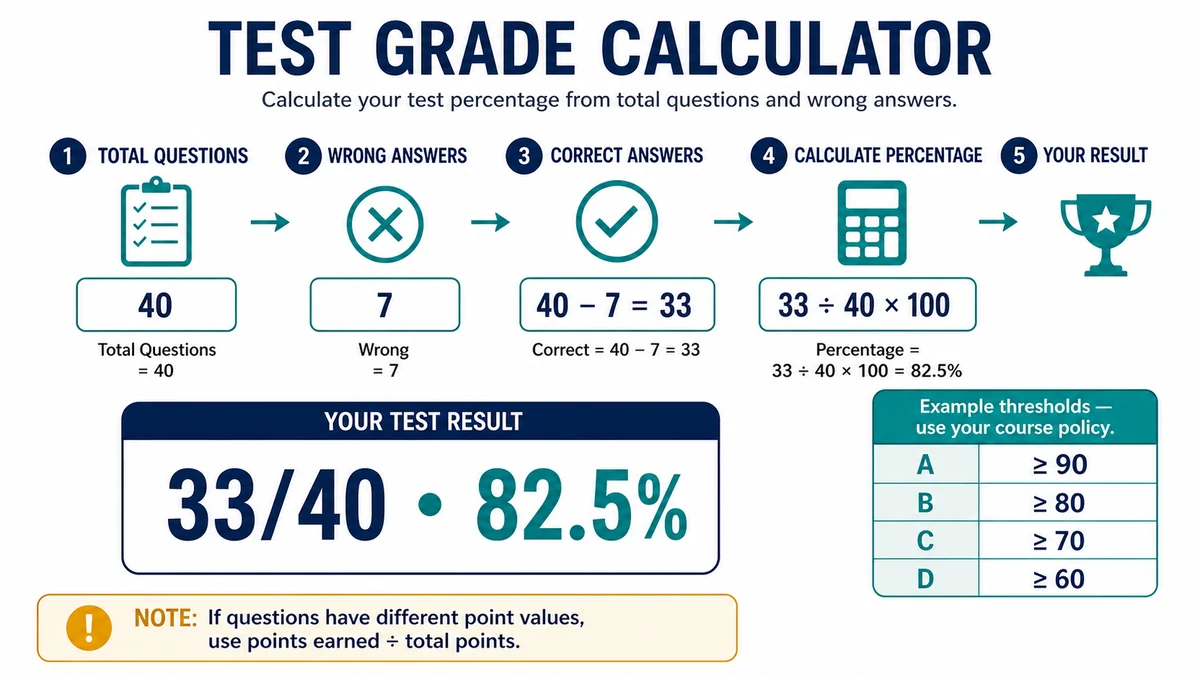
For equal-value questions, correct and wrong counts are two views of the same result. Correct equals total minus wrong, and percentage equals correct divided by total times 100. The fraction display preserves the raw score, which makes the percentage easy to audit.
For tests with unequal question values, use points earned and total points instead of simple item counts. Ten correct questions can represent different performance when some items are worth more than others or partial credit is available.
Letter grades come from the thresholds entered in the calculator. The defaults are examples commonly seen in some systems, not a promise about any teacher, school, board, or country. Edit the boundaries to match the official rule.
Test Percentage, Correct, and Wrong Formulas
Start with a positive total and one known score count. The calculator keeps correct, wrong, fraction, and percentage consistent.
- Correct answers = total questions − wrong answers
- Wrong answers = total questions − correct answers
- Percentage = correct answers ÷ total questions × 100
- Points-based percentage = points earned ÷ total points × 100
- Letter grade = highest editable threshold met by the percentage
Correct and wrong should normally be whole numbers for equal-value questions. Points may include decimals when partial credit is officially allowed. Do not count unanswered items twice; they are usually part of wrong or unearned points unless the scoring policy says otherwise.
Worked Example
For a 40-question test with seven wrong answers, correct = 40 − 7 = 33.
Percentage = 33 ÷ 40 × 100 = 82.5%, and the fraction is 33/40. With example thresholds A ≥ 90, B ≥ 80, C ≥ 70, and D ≥ 60, the estimate falls in the B range.
Changing the B threshold to 83 would change the displayed letter even though 33/40 and 82.5% remain unchanged. The numeric score is arithmetic; the letter is policy.
How to Use the Calculator
- Enter the total number of equal-value questions or the total points possible.
- Enter either wrong or correct, allowing the tool to derive the complementary count.
- Choose percent or fraction display and review the automatically calculated value.
- Edit every letter-grade threshold to match the syllabus, rubric, or examination authority.
- Set a practical table increment and use the reference rows to compare nearby attainable scores.
If the assessment has negative marking, penalties, or weighted items, calculate official points earned first and use the points-based fraction. A question count alone cannot model those rules.
How to Interpret the Result
The percentage expresses earned points as a share of the available total. A difference of one correct answer has a larger percentage effect on a short quiz than on a long test: one item is 10 points on a 10-question quiz but one point on a 100-question test.
The reference table is a planning aid. Its increment controls which score rows are displayed; it does not change the actual calculation. Use an increment of one when every possible correct-answer count matters.
Pass or fail status follows the configured lower threshold. Courses may require a different cutoff, a minimum in each section, or an overall course grade independent of this test. Treat status as an estimate until thresholds are verified. Before entering thresholds, determine whether boundary language uses “at least,” “greater than,” or a rounded whole percentage. A score of 89.5 can be treated differently when the course rounds first, uses the unrounded value, or sets A at 89.5 explicitly. The calculator uses the thresholds you provide, so reproduce the policy exactly rather than relying on familiar defaults. For reference-table planning, remember that some percentages are unattainable on a fixed number of equal-value questions. On a 40-question test, each answer changes the score by 2.5 percentage points; a target of 83% therefore requires 34 correct, which is 85%. If a score report subtracts penalties, enter the resulting points rather than the count correct. Keep total points aligned with any revised maximum after cancelled questions. When multiple attempts are allowed, calculate each attempt separately and apply the course’s replacement or averaging rule outside the test calculator. The tool explains one assessment result; it does not decide how that result enters the overall course grade.
Limits, Policies, and Common Mistakes
Check the scoring rules before relying on the result:
- Unequal item values, partial credit, negative marking, or bonus questions.
- Unanswered items treated differently from incorrect responses.
- Rounding of percentages before or after applying grade thresholds.
- Curved, scaled, percentile, or standards-based grades.
- Separate pass requirements for sections, practical work, or the overall course.
Keep the fraction and official score report. A generic letter label should never replace the instructor’s or examination authority’s issued grade. Verify every configured boundary.
Reliable Sources and Related Calculators
Official grading policies demonstrate why thresholds and interpretations remain local:
- UC Berkeley Registrar — Grades and Grading — official grading information
- University of Texas at Arlington — Grades — institutional grade definitions
Continue your calculation with these related Education tools:
- Marks Percentage Calculator — calculate percentage from raw marks
- Grade Curve Calculator — apply a stated adjustment method
- Final Grade Calculator — use the test result in a course target
Frequently Asked Questions
How do I calculate a test grade?
Divide correct answers or points earned by the total and multiply by 100. The calculator also shows the raw fraction.
Can I enter the number wrong instead of correct?
Yes. The calculator subtracts wrong from total to derive correct, provided the counts describe the same test.
What if questions have different point values?
Use points earned and total points. Simple correct-answer counts would give unequal questions the same weight.
Can I change the letter-grade scale?
Yes. Edit the thresholds to match the official course or examination policy before interpreting the letter and status.
Why does one answer change my percentage so much?
Each item represents 100 divided by the total number of equal-value questions. Shorter tests give each item more percentage weight.
Is the pass or fail result official?
No. It follows the entered thresholds and cannot infer section minimums, curves, or other course rules. Use the official grade report.
Check Whether Questions Have Equal Weight
A simple test percentage assumes every point contributes equally. Extra credit, partial credit, weighted sections, penalties, and curved grading can produce a different course result even when the raw correct-answer percentage is known. Enter points earned and points possible when available, then compare the result with the instructor’s grading policy before converting it to a letter grade.