

Semester Grade Calculator
Calculate your overall semester grade from course grades and credits or weights.
Courses / Subjects
Enter each course grade and its credit value. Blank rows are ignored.
Semester Grade Results
This calculator uses a credit-weighted semester average. Official semester grades may differ if your school uses grade curves, minimum exam requirements, dropped scores, pass/fail subjects, repeated-course rules, or a different grading policy.
The Semester Grade Calculator works out your overall semester percentage when some courses carry more credits than others.
That distinction matters. A 90% result in a one-credit course should not normally influence your semester average as much as an 80% result in a four-credit course. Instead of treating every course equally, the calculator gives each result the weight assigned by its credit value.
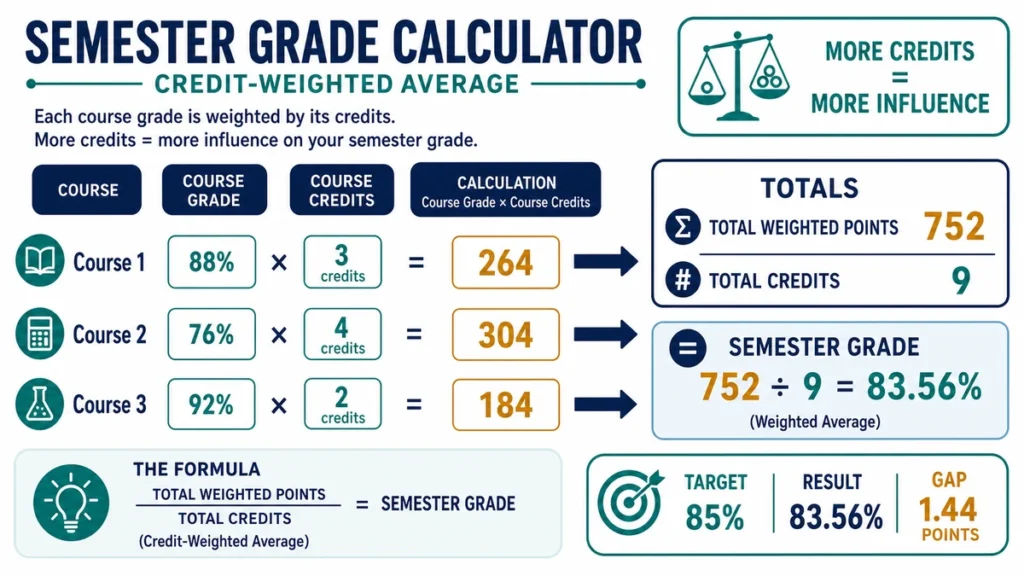
Multiply each course percentage by its credits, add those weighted results, then divide by the total credits.
A Quick Example
Suppose your semester contains five courses:
| Course | Percentage | Credits | Weighted Points |
|---|---|---|---|
| Course 1 | 82% | 3 | 246 |
| Course 2 | 76% | 4 | 304 |
| Course 3 | 91% | 3 | 273 |
| Course 4 | 68% | 2 | 136 |
| Course 5 | 88% | 1 | 88 |
| Total | — | 13 | 1,047 |
Now divide the weighted points by the total credits:
1,047 ÷ 13 = 80.538…
Rounded to two decimal places:
Semester average = 80.54%
If you simply averaged the five percentages, you would get:
(82 + 76 + 91 + 68 + 88) ÷ 5 = 81%
That result is slightly higher because it gives the one-credit 88% course the same influence as the four-credit 76% course.
The credit-weighted average of 80.54% reflects the different course loads.
How to Use the Semester Grade Calculator
Start with your semester course list or official registration record.
For each course:
- Enter the final or expected course percentage.
- Enter the number of credits attached to that course.
- Add the next course and repeat.
- Check that every percentage uses the same 0–100 scale.
- Click Calculate.
- Review the total credits, weighted points, and semester average.
If you are testing a future scenario, you can enter an estimated percentage for an unfinished course. Keep projected grades clearly separate from official results.
The Formula Behind the Calculator
For every course:
Weighted points = Course percentage × Course credits
Then add all weighted points and all credits.
The semester average is:
Semester average = Σ(Course percentage × Course credits) ÷ Σ(Course credits)
The symbol Σ simply means “add all of them together.”
For example:
(82 × 3) + (76 × 4) + (91 × 3) + (68 × 2) + (88 × 1)
divided by:
3 + 4 + 3 + 2 + 1
gives:
1,047 ÷ 13 = 80.54%
Why Credits Change the Average
Credits act as weights.
Imagine two courses:
Course A: 95% with 1 credit
Course B: 75% with 5 credits
A simple average would be:
(95 + 75) ÷ 2 = 85%
But the five-credit course represents much more of the semester.
Using credit weighting:
95 × 1 = 95
75 × 5 = 375
Total weighted points:
470
Total credits:
6
Semester average:
470 ÷ 6 ≈ 78.33%
That is a very different answer.
The calculator prevents a small-credit course from having the same influence as a much larger one.
Credits and Marks Are Different Things
A course percentage tells you how well you performed.
Credits tell you how much weight that course carries in the academic program.
For example:
86% in a 4-credit course
means something different from:
86% in a 1-credit course
The performance percentage is the same, but the four-credit course contributes four times as much to a credit-weighted semester calculation.
Do not enter raw marks in the credit field.
Likewise, do not use the number of assignments, weekly classes, or study hours as credits unless your institution specifically defines them that way.
When All Courses Have the Same Credits
If every course has exactly the same credit value, a weighted average and a normal arithmetic average produce the same result.
Suppose you have:
80%, 85%, 90%, and 75%
and each course is worth 3 credits.
The ordinary average is:
(80 + 85 + 90 + 75) ÷ 4 = 82.5%
The weighted calculation produces the same answer because every course carries equal weight.
So credit weighting becomes especially important when the semester contains courses with different credit values.
Percentage Average and GPA Are Not the Same Calculation
This calculator works with course percentages.
It does not automatically convert those percentages into letter grades or GPA points.
For example, a university might convert:
85% → A → 4.0 grade points
while another institution could use a different grade boundary.
If your academic system calculates semester GPA from letter grades and grade points, use the GPA Calculator instead.
Do not mix values such as:
82%
and:
3.7 GPA
in the same semester-average calculation.
They belong to different grading systems.
What If a Laboratory Has Its Own Credits?
Check how your institution records it.
A laboratory may be:
- part of the main course grade;
- listed as a separate credit-bearing course;
- pass/fail;
- assessed independently; or
- combined with lectures before the final course percentage is issued.
If the lab already contributes to the percentage for another course, entering it again as a separate row would double-count it.
If it appears separately on the academic record with its own percentage and credits, it may need its own row.
Use the same structure your institution uses.
Planning With an Unfinished Course
Suppose four courses are already complete and one course is still in progress.
You can enter a possible final result for that remaining course to see what your semester average could become.
For example, you could test:
70%
then:
80%
then:
90%
for the unfinished course.
This gives you a range of possible semester outcomes.
If the course itself contains unfinished assignments and exams, calculate its likely final percentage first. The Weighted Grade Calculator can help when different parts of that course carry different weights.
Once you have a reasonable course percentage estimate, enter it into the Semester Grade Calculator.
Which Course Has the Biggest Effect?
A high-credit course usually has more power to move the semester average.
Suppose you could improve two course results by five percentage points.
One course carries:
1 credit
The other carries:
5 credits
The weighted improvement is:
5 × 1 = 5 weighted points
versus:
5 × 5 = 25 weighted points
The five-credit course creates five times as much movement in the weighted total.
This does not automatically tell you where to spend your study time, but it does explain why some courses influence the semester result more strongly than others.
What If Credits Are Not Available?
Do not invent credit values from classroom hours or course difficulty.
If your institution explicitly treats every course equally, you can enter the same weight for every course.
For example, giving every course a weight of 1 produces an ordinary average.
If the institution uses another system—such as subject weights, coefficients, units, or contact-hour weighting—use those official values if they operate as the relative weights in the semester formula.
When the calculation method is unclear, check the academic handbook or registrar information before treating a self-calculated result as official.
Pass/Fail and Audit Courses
Courses without a percentage contribution may need to be excluded.
For example, a pass/fail course might earn academic credit but not contribute to a percentage-based semester average.
An audited course may appear on a record without affecting the calculated semester result.
Do not automatically include every registered course. Include the courses that your institution actually counts in the relevant average.
Why Your Portal May Show a Different Semester Average
A difference does not always mean your arithmetic is wrong.
Your institution may use:
- letter-grade points instead of percentages;
- hidden decimal precision;
- excluded pass/fail courses;
- repeated-course rules;
- course-specific coefficients;
- rounded course results;
- incomplete grades;
- different credit values; or
- another institutional formula.
If your calculator result differs from the official portal, compare one course at a time.
Check the percentage, credit value, and whether that course is actually included.
A small difference may come from rounding. A larger difference usually indicates that the portal is using a different rule or different set of courses.
Avoid Rounding Too Early
Suppose a course result is actually:
82.67%
but you enter:
83%
The difference seems small, but several rounded course values can slightly change the final semester average.
Use the most precise official percentages available while calculating.
Round the final semester result only after all weighted points have been combined, unless your institution specifies another method.
Common Semester Grade Mistakes
Taking a Simple Average When Credits Differ
This gives every course equal influence.
Use credit weighting whenever courses have different credit values.
Entering GPA Points Instead of Percentages
A 3.5 GPA and an 85% course result are not values on the same scale.
Use a GPA calculator when your institution works with grade points.
Counting a Course Twice
This can happen when a laboratory or project is already included in the main course result and is then entered separately.
Check the course structure before adding another row.
Guessing the Credits
Use the official credit value.
Do not estimate credits from how difficult a course felt or how many hours you attended.
Including Pass/Fail Work Automatically
A course can count toward degree completion without affecting the semester percentage.
Follow the institution’s calculation rules.
Treating a Projected Grade as Official
Scenario planning is useful, but an estimated course result should stay clearly labeled until the actual grade is issued.
Checking the Result by Hand
Take each course percentage and multiply it by the course credits.
For example:
78% × 3 credits = 234
84% × 4 credits = 336
91% × 2 credits = 182
Add the weighted points:
234 + 336 + 182 = 752
Add the credits:
3 + 4 + 2 = 9
Now divide:
752 ÷ 9 = 83.56%
So the credit-weighted semester average is approximately:
83.56%
That manual process should reproduce the calculator result.
Keep the Calculation With the Course List
If you are using the result for planning or checking your academic record, save more than the final percentage.
Keep:
- the courses included;
- each course percentage;
- each credit value;
- total credits;
- calculated semester average;
- calculation date; and
- whether any course result was projected.
That makes it much easier to update the calculation later or investigate a difference with the student portal.
Useful Follow-Up Calculations
If one course is still unfinished and you need to know what exam score could produce a particular final result, use the Final Grade Calculator.
Once a semester is complete, the CGPA Calculator can combine it with other semesters using their appropriate GPA credits.
If your source data is raw marks rather than a percentage, use the Marks Percentage Calculator first.
FAQ
How do I calculate a semester average with credits?
Multiply each course percentage by its credits, add those weighted values, and divide by the total credits.
Semester average = Total weighted points ÷ Total credits
Are course credits the same as marks?
No.
The percentage or mark describes your performance, while the credits describe how much weight the course carries.
What happens if all courses have equal credits?
The credit-weighted result becomes the same as the ordinary average of the percentages.
Can I enter an unfinished course?
Yes, if you want to model a scenario.
Enter a reasonable expected percentage and replace it with the official result once the course is completed.
Should pass/fail courses be included?
Only if your institution includes them in the percentage-based semester calculation.
Some courses earn credits without contributing a numerical grade.
Does this calculate my semester GPA?
Not necessarily.
This calculator produces a credit-weighted percentage average.
If your institution converts course grades into grade points and calculates GPA from those points, use the appropriate GPA method instead.
Why is my semester average different from my university portal?
The portal may use grade points, hidden decimals, excluded courses, different credit values, or institution-specific rules.
Compare the individual course entries before comparing only the final result.
Can I use course weights instead of credits?
Yes, if those weights represent the official relative contribution of each course and every row uses the same weighting system.
Do not mix credits and unrelated percentage weights without understanding how the institution combines them.
Academic Reference
For an example of how academic records can distinguish grades, credits, and averages, see:
Cornell University Registrar — Transcript and GPA Information
Academic calculation methods vary between institutions, so your own registrar, transcript, or academic handbook remains the appropriate source for the official semester result.
One Average, but Not Equal Influence
A semester may contain several course percentages, but those percentages do not always deserve equal influence.
If a four-credit course and a one-credit course are treated identically, the resulting average can misrepresent the structure of the semester.
The Semester Grade Calculator keeps the weighting visible. Use the official course percentages and credits, preserve the underlying course list, and treat projected grades as scenarios rather than academic records.
When an official portal reports something different, use the calculator to investigate the difference—not to overwrite the institution’s result.